You can choose whether documents created by Sufio are accessible online or sent only as PDF attachments.
Online documents allow customers to view, download, print, and—in some cases—pay invoices online using a credit card.
Sufio—an invoicing app for Shopify—lets you share documents through secure links that customers can access from emails, your store’s Customer account page, or the Thank you page.
Whether to enable online documents depends on your workflow and how you deliver documents to customers. If you use Shopify order confirmation emails or third-party apps such as Omnisend and Klaviyo to share invoice links, you need to enable online documents.
To disable online documents and send documents only as PDF attachments:
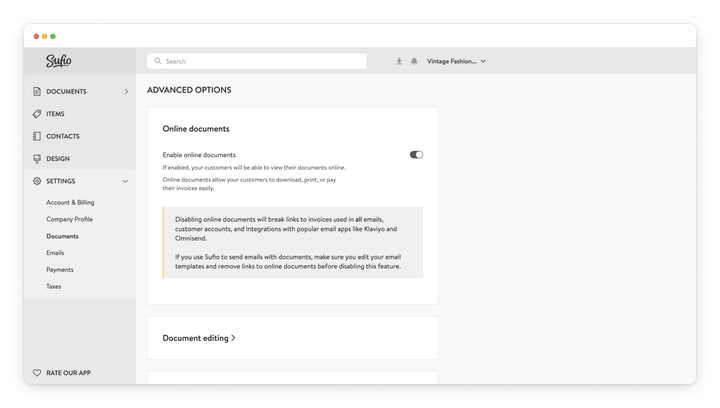
- In your Sufio account, go to the Settings → Documents page.
- Scroll down to the Advanced options section and expand Online documents.
- Turn the Enable online documents toggle off.
- Click on the Update settings button at the top of the page to apply the changes.
- Make sure you edit your email templates and remove any links to online documents.
Caution
This change also applies to documents that were created previously.
Online documents are accessed through anonymized links. Each link is secured with a unique identifier and an additional security token, ensuring that only the intended recipient can open the document.
This also prevents the recipient from accessing any other documents from Sufio.
For additional security and privacy, these pages do not include tracking scripts used by marketing tools.
Online documents are also not indexed by search engines such as Google, which prevents them from being discovered accidentally.
Caution
Disabling online documents breaks links to invoices used in all emails, customer accounts, and integrations with email apps such as Klaviyo and Omnisend.
If you use Sufio to send emails with documents, make sure you update your email templates and remove links to online documents before disabling this feature.