Document numbering defines how your invoices and other documents are identified and organized.
Choosing the right numbering system helps you stay compliant with legal requirements and keeps your accounting records clear and easy to manage.
Sufio is an invoicing app for Shopify that automatically generates documents—such as invoices and credit notes—based on your store’s orders and settings.
As a store owner, you can decide how your invoices and other documents will be numbered. Typically, the two legal requirements you should meet are:
- Each invoice number must be unique.
- Invoices need to be numbered in order with consecutive numbers in the order in which they were created.
However, the number of digits, the addition of the year or month, or the inclusion of the order number is entirely up to you.
Some businesses include the year or month in their invoice numbers to make documents easier to sort. Others prefer simple sequential numbering.
Including the order number in the invoice number helps store owners match invoices with orders easily.
However, this approach may not be suitable if invoices are created in a different order than orders (for example, when orders are paid or fulfilled).
With Sufio, you can customize the invoice numbering according to your personal preference:
- In your Sufio account, go to the Settings → Documents page.
- Scroll down to the Invoices → Numbering section and select the numbering system for your invoices:
- Same as order numbers
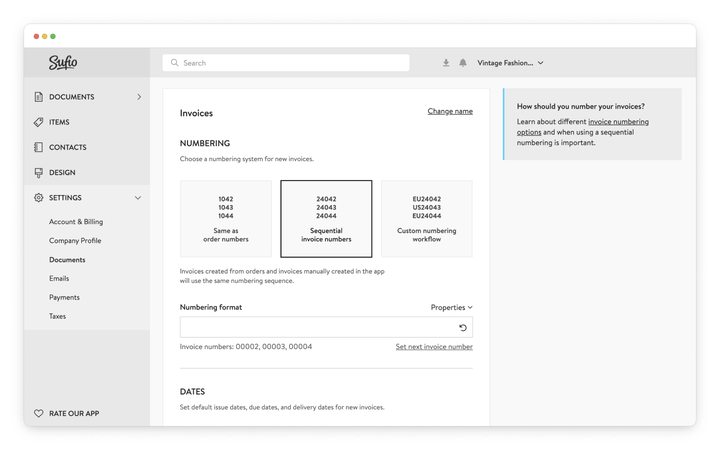
- Sequential invoice numbers
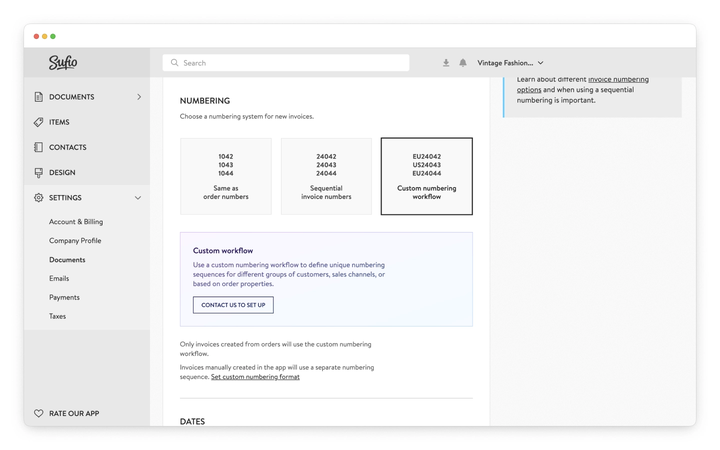
- Custom numbering workflow
- Click on the Update settings button at the top of the page to apply the changes.
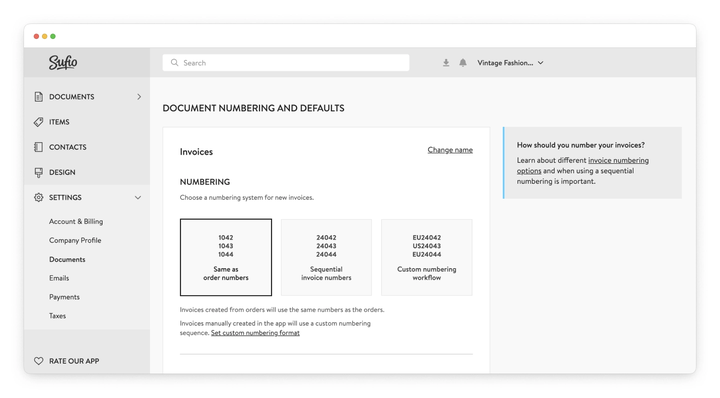
Using this setting, Sufio creates invoices from orders in your online store with the same numbers as the orders.
Please note that you cannot change the order numbering in Shopify. Orders in Shopify are always numbered sequentially, starting from 1001. You can only add a prefix or suffix to the order number.
Invoices created manually in Sufio use a separate custom numbering sequence.
Using this setting, Sufio creates invoices from orders in your online store as well as invoices created manually in the app using the same numbering sequence.
By default, the numbering sequence starts with 00001 for invoices.
You can customize the numbers by entering your own format in the Numbering format field. The format can include any prefix or suffix, or one of the following properties.
####
Sequential number where each # character represents a digit.
If the numbering includes a date component, the sequence resets at the start of each period. For example, 2025-05-0001, 2025-05-0002, and 2025-06-0001.
%%%%
Sequential number, where each % character represents a digit.
If the numbering includes dates, the sequence does not reset, resulting in invoice numbers such as 2025-05-0001, 2025-05-0002, 2025-06-0003.
DD
Day of issue, such as
31
for documents issued on the 31st.MM
Month of issue, such as 12 for documents issued in December.
YY
The issue year of the document—the last two digits, such as 25 for documents issued in 2025.
YYYY
The issue year of the document, such as 2025 for documents issued in 2025.
OOOO
The order number without the # character, such as 1042.
For example, if two invoices were created in May 2025 and one invoice was created in June 2025, the resulting invoice numbers will change depending on the selected numbering format:
| Numbering format | Invoice numbers |
|---|---|
| ##### | 00001, 00002, 00003 |
| ### | 001, 002, 003 |
| YYYY-### | 2025-001, 2025-002, 2025-003 |
| YYYY-MM-### | 2025-05-001, 2025-05-002, 2025-06-001 |
| YYYY-MM-%%% | 2025-05-001, 2025-05-002, 2025-06-003 |
| OOOO-%%% | 1001-001, 1002-002, 1003-003 |
| EU-### | EU-001, EU-002, EU-003 |
A preview of the invoice numbers is displayed below the Numbering format field for reference.
To update your existing numbering sequence, click on Set next invoice number and enter the starting number for the new sequence.
Caution
Changes apply only to newly created invoices. Previously created invoices retain their original numbers.
You can use a custom numbering workflow to set up unique numbering sequences for different groups of customers, sales channels, or based on order properties.
For example, you can create separate sequences for European and US customers, resulting in invoice numbers such as EU-001, EU-002, US-001, EU-003.
Note
You can apply similar numbering rules to other document types as well
Yes. If you're migrating from another system and want your Sufio numbering to pick up where you left off, go to Settings → Documents, scroll to the Invoices → Numbering section, and click Set next invoice number. Enter the number you want Sufio to use for the next invoice and save. All invoices created after that point will follow the new sequence.
Both represent a sequential number, but they behave differently when your format includes a date component like MM or YYYY.
With ####, the counter resets at the start of each date period. So with a format of YYYY-MM-###, you'd get 2025-05-001, 2025-05-002, then 2025-06-001 when June begins.
With %%%%, the counter never resets; it keeps incrementing regardless of the date. The same format with %%%% would give you 2025-05-001, 2025-05-002, 2025-06-003.
If your accountant or local regulations require invoices to always be strictly consecutive with no resets, use %%%%. If resetting per month or year is acceptable—or if it makes your records easier to organize—use ####.
No. Changes to your numbering format or sequence apply only to invoices created after the change is saved. Existing invoices keep their original numbers.
No. Shopify controls order numbering, which starts from 1001 and increases sequentially. You can add a prefix or suffix in Shopify, but the numbers themselves cannot be changed. If you use the Same as order numbers mode in Sufio, your invoice numbers will follow that pattern.
Invoices created manually in Sufio, outside of Shopify orders, do not have an order number to reference.
These invoices use a separate sequential numbering sequence automatically. If you want all invoices, including manual ones, to follow a single sequence, use Sequential invoice numbers instead.
Yes. Numbering settings apply to invoices by default, but similar rules can be configured for other document types, such as credit notes.
If you need help setting this up, you can contact our support team.
Gaps can occur if an invoice is deleted or if the numbering sequence is changed. To adjust numbering going forward, use the Set next invoice number option in your settings. If you need to update existing documents, you can contact our support team.