The delivery date on an invoice shows when goods or services were delivered to your customer.
Depending on your local legislation, the delivery date may have legal implications. For example, it can mark the start of the warranty period or determine the date of the taxable supply for VAT collection purposes.
Sufio is an invoicing app for Shopify stores that can automatically set the delivery date to the order fulfillment date on new invoices.
Delivery dates are not set by default.
To set how delivery dates are applied to new invoices:
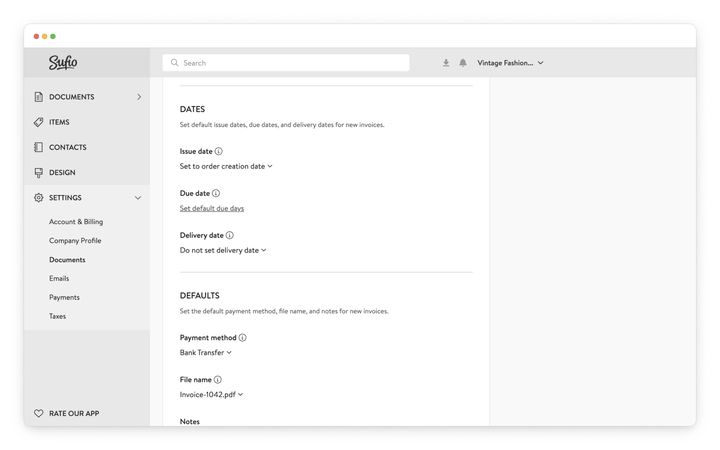
- In your Sufio account, go to the Settings → Documents page.
- Scroll down to the Document numbering and defaults → Dates section.
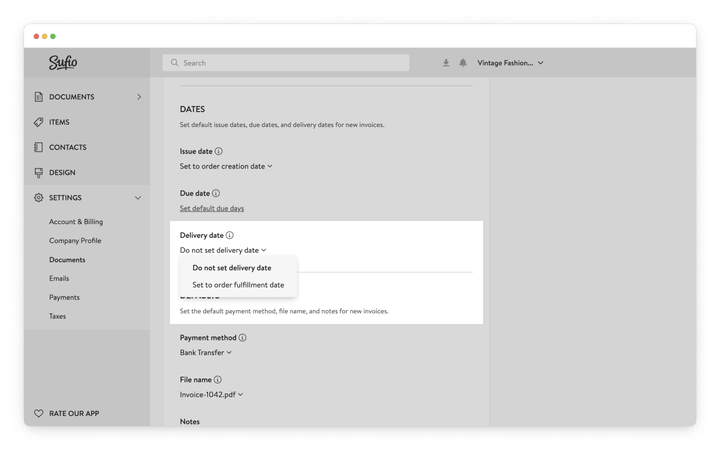
- From the dropdown under Delivery date, select one of the options in the section below.
- Click on the Update settings button at the top of the page to apply the changes.
Sufio will not assign a delivery date to invoices. The delivery date field will not be displayed on your documents.
Sufio automatically sets the delivery date to the date when the order is marked as fulfilled in your Shopify admin.
The delivery date is set only if the order is fulfilled before the invoice is created. If the invoice is created before the order is fulfilled, the delivery date is not set. In this case, you can set the delivery date manually on the invoice.
If the order is fulfilled in multiple shipments, the delivery date is set to the date of the first fulfillment.
You can set the delivery date manually, directly on the invoice.
To set the delivery date manually:
- In your Sufio account, go to Invoices.
- Open an existing invoice or create a new one.
- In the invoice detail view, locate the Delivery date field on the left side.
- Enter or edit the date.
- Click Save
Sufio uses the date of the first fulfillment. If an order is split across multiple shipments, later fulfillment dates are not considered.
This usually happens if the invoice was created before the order was fulfilled.
Sufio sets the delivery date only if the order is fulfilled before the invoice is created. In this case, you can set the delivery date manually on the invoice.
It can also happen if “Do not set a delivery date” was selected when the invoices were created.
Delivery date settings apply only to invoices created after the change is saved—existing invoices are not updated automatically.
If none of the above applies and the delivery date is still not displayed, make sure the field is enabled in your document template.