When running a Shopify store, generating invoices from your orders is essential for accounting, tax compliance, and customer communication.
Depending on your workflow, this can be done either manually or through automated systems.
With Sufio, you can easily create invoices automatically or manually, giving you full flexibility to choose the level of control that best fits your business.
This article covers:
By default, Sufio automatically creates invoices for all orders when they are created in your store.
You can change these settings to control which orders invoices are created for and when they are generated.
To set up automatic creation of invoices:
- In your Sufio account, go to Settings, then open Documents.
- In the Automatic document creation section, find Invoices and credit notes.
- In Automatically create invoices from all orders, select for which orders invoices should be created.
- In Create invoices when orders are created, select when invoices should be created
- Click Update settings at the top of the page.
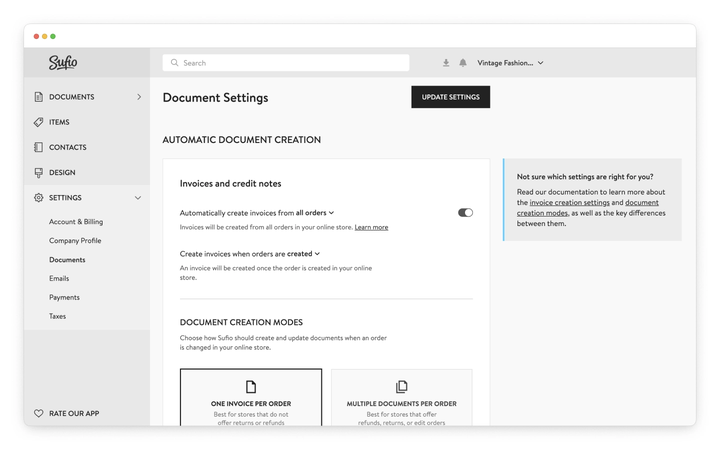
The Automatically create invoices dropdown lets you choose whether invoices are created for all orders or only for specific types of orders.
You can select from the following options:
All ordersInvoices are created for all orders in your store. This is the default setting.
B2B orders
Invoices are created only for B2B orders in your store.
B2B orders are defined as orders placed by:
- orders placed by customers linked to a B2B company,
- orders placed by customers tagged as
b2b, and - orders placed by customers with a VAT number.
Wholesale orders
Invoices are created only for orders placed by wholesale customers.
Wholesale customers are customers tagged as
wholesalein your store.Non-recurring orders
Invoices are created for all orders except those labeled as subscription recurring orders.
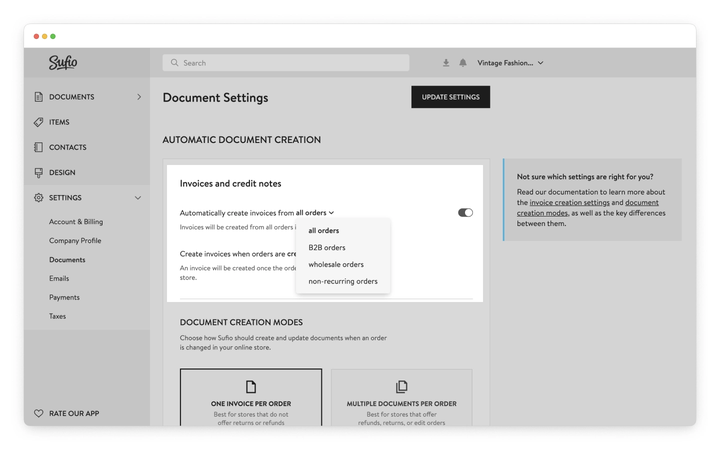
The Create invoices when orders are created dropdown lets you choose when invoices are generated based on the order status.
You can select from the following options:
- Created
Sufio creates an invoice as soon as the order is created in your online store. This is the default setting.
Paid
An invoice is created only when the order is marked as paid.
An order can be paid during the checkout, or it can be manually marked as paid in your store admin.
Not paid
An invoice is created when the order is created but not paid during checkout.
This option is useful if your store offers manual payment methods, such as bank transfer.
Fulfilled
An invoice is created when the order is marked as fulfilled (shipped).
An order can be manually marked as fulfilled in your store admin.
Invoices are created only when the order is fully fulfilled. Partial fulfillments do not trigger invoice creation.
Custom
Custom workflows allow you to create invoices for specific orders, such as those from certain customer groups, sales channels, or based on order properties.
This feature is available only on the Premium plan and higher.
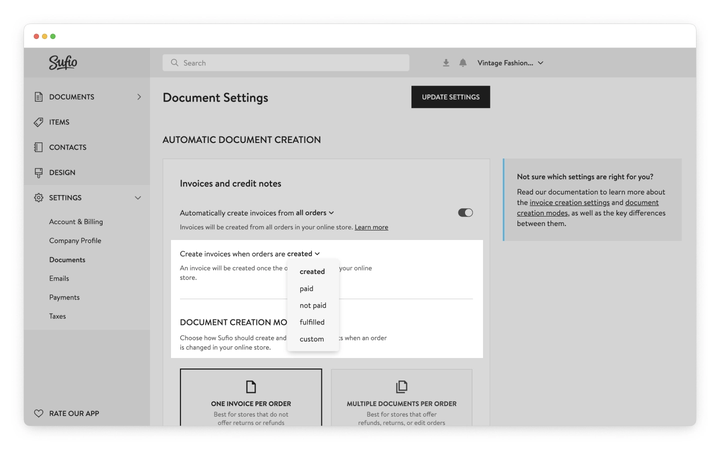
Contact our support team to set up a custom workflow that suits your needs.
Note
When you first install Sufio, the app automatically creates invoices for the last 5,000 orders in your store.
If you need invoices for older orders beyond that, contact our support team to have the app cover a larger number of orders.
If you prefer full control over your invoicing workflow, you can create invoices manually instead of generating them automatically.
This can be useful if you only want to issue invoices for specific orders or review them before sending.
Before creating invoices manually, turn off automatic invoice creation. This prevents invoices from being generated without your input.
To turn off automatic creation of invoices:
- In your Sufio account, go to Settings, then open Documents.
- In the Automatic document creation section, find Invoices and credit notes, then turn off Automatically create invoices from all orders.
- Click Update settings at the top of the page.
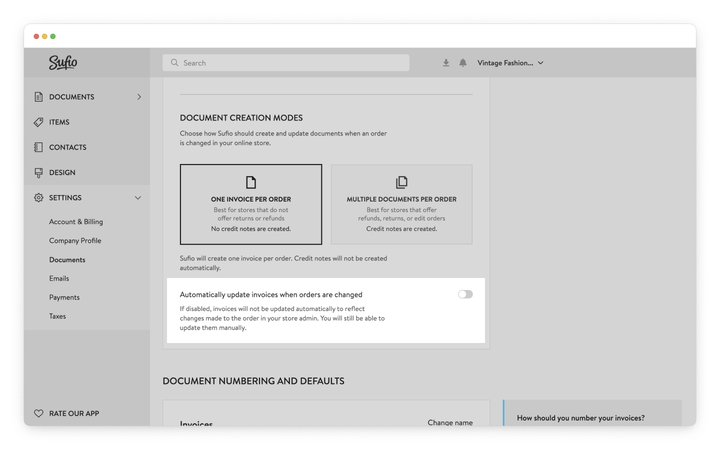
You can select individual orders from which Sufio will create an invoice.
- In your Shopify admin, go to the Orders page.
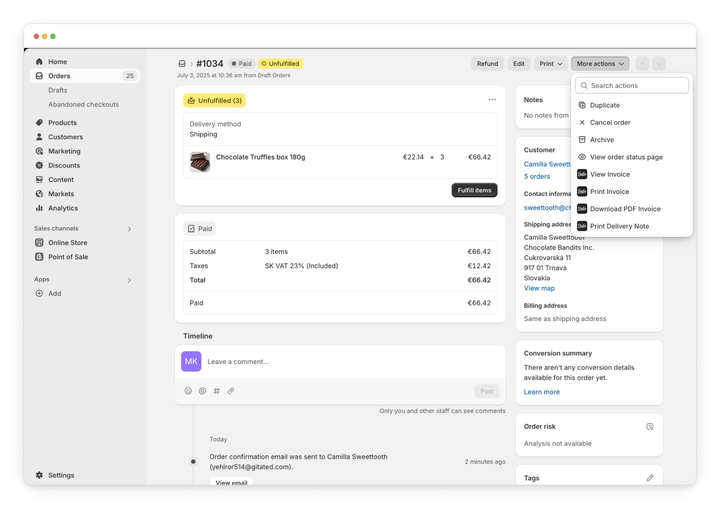
- Open the order from which you want to create an invoice.
- From the More actions dropdown, click on the View invoice button.
- Your Sufio account will open with a confirmation dialog. Here, click on the Create button.
Sufio creates an invoice from an order. You can download the invoice as a PDF document or send it to your customer.
Note
Manual creation of invoices in your Shopify admin is a part of the admin action links feature.
However, unlike other options that can be done in bulk, you can only create invoices for one order at a time.
You can create standalone invoices manually without an existing store order.
Given that your Sufio account can be synced with the data in your online store, creating standalone invoices is a simple process. The customer and product fields will show synced options in the dropdowns, meaning you don't have to type things out each time.
Manually created invoices can be numbered separately from invoices created from orders, or they can follow the same numbering sequence.
Manual invoices, however, are separate from your store orders. Creating such an invoice does not automatically create an order in your store.
To create an invoice manually:
- In your Sufio account, go to the Documents and then Invoices.
- Click on the New invoice button.
- Fill out the desired fields and click on the Save button to apply the changes.
You have now created a standalone invoice. You can now view the invoice, send it, and download it.
If VAT is not shown on your Shopify invoices in Sufio, it is usually caused by your tax configuration in Shopify or the customer’s tax status.
The most common reasons are:
- Taxes are not correctly set up in your Shopify admin
- The product is not marked as taxable
- The customer is VAT-exempt
- The order is a cross-border sale, where different VAT rules apply
- Your VAT number is missing in your Sufio account settings
Sufio generates invoices based on Shopify order data and applies tax logic where applicable.
To make sure VAT is displayed correctly, review both your Shopify tax settings and your company details in Sufio.
Sufio does not create invoices for draft orders in Shopify.
Invoices are only created once an order becomes a regular Shopify order and meets your document creation conditions (for example, when the order is created or paid).
If you need to issue a document before the order is finalized, you can use a pro forma invoice, which is designed for pre-payment or draft scenarios.
If an invoice was not created for your Shopify order, it is usually due to your invoice creation settings in Sufio.
Common reasons include:
- The order does not meet your automatic invoice creation conditions
- The order status (such as unpaid or draft) does not match your setup
- The order was created before Sufio was installed
- Automatic invoice creation is disabled
To solve this, review your document creation settings in Sufio and make sure they match your intended workflow.
Yes, Sufio can generate invoices for historical Shopify orders.
When you install Sufio, invoices are automatically created for many of your recent orders, and you can create invoices for older orders manually or in bulk.
Automatic invoice creation applies only to new orders, so older orders may require manual action depending on your setup.
Sufio allows you to customize invoice numbering to match your business or legal requirements.
You can:
- Add customized prefixes
- Set the starting number for your invoices
- Use separate numbering sequences for invoices and credit notes
- Set up numbering for different stores or workflows
These settings help you maintain consistent and compliant invoice records across your Shopify store.
If your company name or VAT number is missing on your invoice, it is usually because the information is not fully configured in your Sufio account.
Check that:
- Your company details are completed in Sufio
- Your VAT number is entered and saved
- The correct customer information is provided in Shopify
Sufio uses this data to generate compliant invoices, so keeping it up to date guarantees all required details are displayed correctly.
Sufio allows you to control both when invoices are created and when they are sent to customers.
You can:
- Define conditions for automatic invoice creation (for example, based on order or payment status)
- Enable or disable automatic sending of invoices
- Send invoices manually when needed
This gives you full control over your invoicing workflow and allows you to align it with your business processes.
When importing historical orders into Shopify, Sufio may treat them as new orders and create invoices automatically.
To prevent this, you can:
- Temporarily disable automatic invoice creation
- Disable automatic sending of invoices
- Adjust your conditions so imported orders do not trigger invoicing
After the import is complete, you can restore your preferred settings.