Correct VAT calculation on a French Shopify store depends primarily on your VAT-registered status.
French VAT rules are straightforward for domestic sales, but they become more complex once you sell to other EU countries, where thresholds, registration types, and country-specific rates all come into play.
If you're VAT-registered and sell to both consumers (B2C) and business customers (B2B) across different EU countries, you'll need to configure your tax settings and tax rates correctly to charge the right VAT to every customer—whether they're based in France, elsewhere in the EU, or purchasing digital goods.
Sufio, an invoicing app for Shopify stores, uses your tax settings to generate accurate, compliant invoices for every order, so getting these settings right from the start makes bookkeeping much easier down the line.
This article walks you through setting up taxes for a Shopify store based in France.
Last updated on July 28, 2026.
Caution
On January 1, 2025, new EU VAT regulations came into force. Among other changes, the EU introduced a new simplified VAT scheme for small and medium-sized enterprises (SMEs).
Under this new scheme, businesses with an annual turnover below €100,000 across the EU may now qualify to be VAT-exempt.
This is subject to national implementation of the EU legislation, so we recommend you consult your local tax authority.
In this article, we will discuss
To charge VAT to some customers and not to others, you may choose from two possible settings, based on how you would like to display product prices in your Shopify store.
If you are selling for the most part to consumers (B2C), you may prefer to display product prices including VAT.
To display your product prices with VAT included while still allowing business customers to have VAT deducted at checkout:
- In your Shopify admin, go to the Settings → Taxes and duties page.
- In the Global settings section, check Include sales tax in product price and shipping rate.
- Click Save to apply the changes.
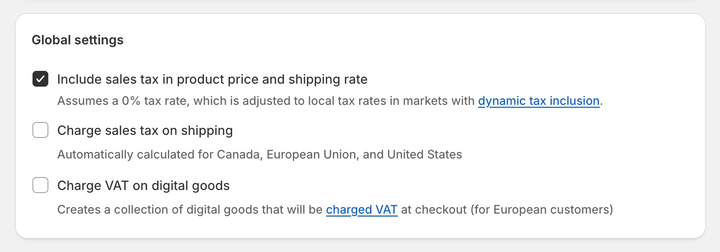
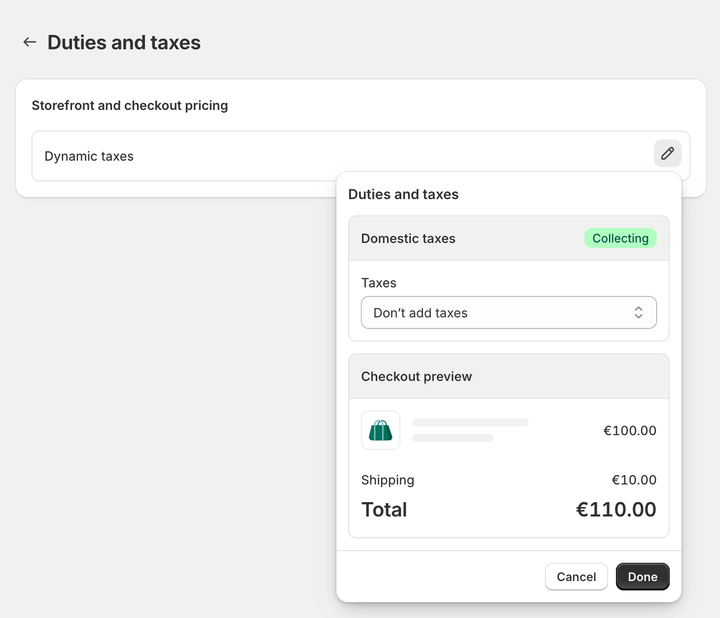
You can also enable dynamic tax inclusion, a Shopify feature that automatically includes or excludes VAT based on the customer's region and adjusts the tax rate accordingly.
To activate dynamic tax inclusion:
- In your Shopify admin, go to Settings → Markets, and select the market you want to configure for tax collection.
- Click Duties and taxes, then click Edit next to Storefront and checkout pricing.
- Under Domestic taxes, select Dynamic taxes, then click Done.
- Click Save to apply the changes.
If most of your customers are businesses (B2B), you can choose to have your product prices displayed as excluding VAT.
To display your product prices excluding VAT:
- In your Shopify admin, go to the Settings → Taxes and duties page.
- In the Global settings section, uncheck Include sales tax in product price and shipping rate.
- Click Save to apply the changes.
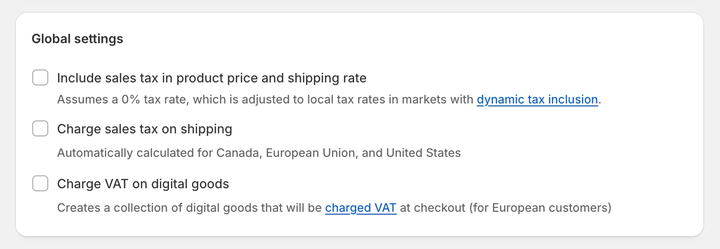
You can also disable dynamic tax inclusion if you'd rather keep prices consistently VAT-excluded across all markets:
- In your Shopify admin, go to the Settings → Markets and select the market you want to configure tax collection.
- Click Duties and taxes, then click Edit next to Storefront and checkout pricing.
- Under Domestic taxes, select Don't add taxes, then click Done.
- Click Save to apply the changes.
As of 2026, the standard VAT rate (TVA, or Taxe sur la valeur ajoutée) in France remains 20%.
Reduced rates of 10%, 5.5%, 2.1%, and 0% apply to specific categories, such as food and beverages, medical equipment, and transport charges.
In the EU, the VAT rate you charge on physical and digital goods depends on your store's taxable turnover, not just where the customer is located.
When selling physical goods to customers in France—whether they're VAT-registered or not—you should always charge French VAT.
When selling to non-VAT-registered customers outside France but still within the EU, you do charge VAT.
The rate depends on whether your sales breach the micro-business threshold of €10,000 (excluding VAT).
If you're selling to VAT-registered businesses in other EU countries, you should not charge VAT. Shopify calculates the correct rate automatically based on the registration type set in your tax settings.
Selling within the micro-business threshold
If your taxable turnover outside France—but within the EU—stays below €10,000 (excluding VAT) over a calendar year, you qualify for the micro-business exemption.
Under this scheme, you charge French VAT to all non-VAT-registered customers across the EU, using a single VAT registration for all EU sales.
To use this scheme, apply for the exemption with your local tax authority. Once approved, set up your tax settings in Shopify admin—this only needs to be done once.
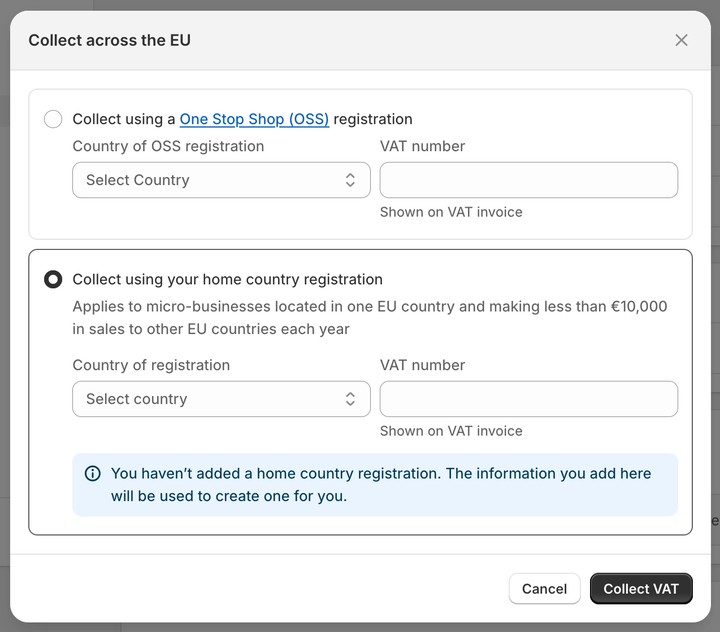
To set VAT rates for the micro-business exemption scheme and charge your home country's VAT rate on all orders:
- In your Shopify admin, go to the Settings → Taxes and duties page.
- In the Regional settings section, click European Union.
- In the Collect VAT cross-border section, click Collect VAT.
- In the Collect across the EU window, select Collect using your home country registration.
- Select your Country of registration and enter your VAT number. Leave this field blank if you've applied for a VAT number but don't have one yet; you can add it later.
- Click Collect VAT to save your changes.

Surpassing the micro-business threshold
Once your taxable turnover outside France (but within the EU) exceeds €10,000 in a twelve-month period, you must register for VAT in each country you sell to and charge that country's rate.
In practice, this means customers in different EU countries will be charged different VAT rates, ranging from 17% to 27%.
For example, say your business is based in France and you sell to consumers in Belgium and Germany. As long as your combined sales to those two countries stay under €10,000, you simply charge the French VAT rate of 20%.
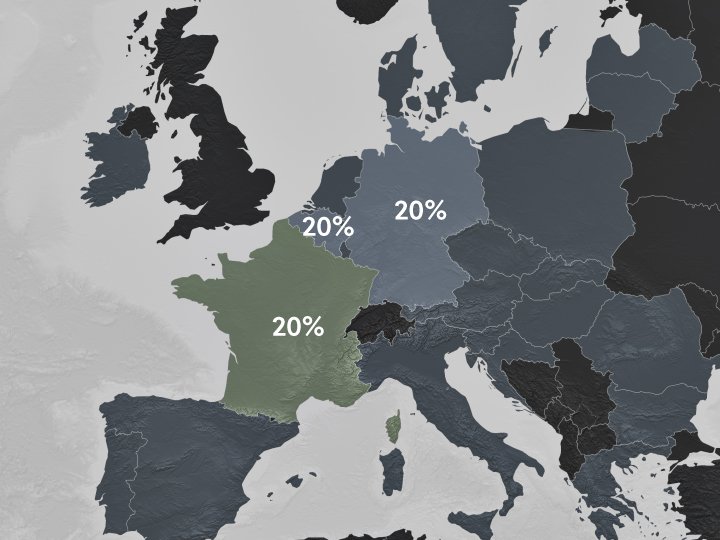
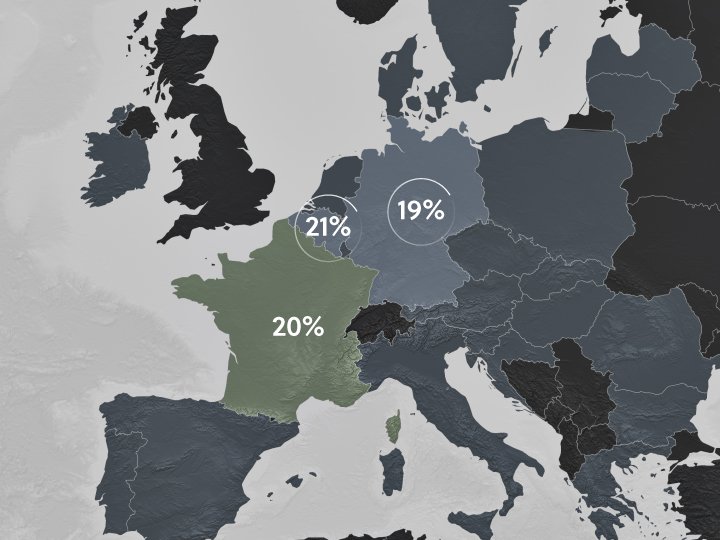
But once your sales in Belgium alone cross that €10,000 threshold, you're required to register for VAT in both Belgium and Germany.
From that point on, you'd charge 21% Belgian VAT on goods sold in Belgium and 19% German VAT on goods sold in Germany.
Registering for VAT separately in each EU country you sell to can quickly become time-consuming.
The One Stop Shop (OSS) Union scheme addresses this issue. You still charge VAT at the rate of the customer's country, but you only need to file a single OSS VAT return covering all your EU sales.
Note
This applies to non-VAT-registered consumers only. If you sell to VAT-registered businesses in the EU, you do not charge VAT.
To charge your Belgian and German customers the correct VAT rate, set your tax settings accordingly. Shopify lets you select OSS as your VAT registration type, so the right rates are applied automatically.
To set VAT rates for the OSS scheme and charge your customers' shipping-country VAT rate on all orders:
- In your Shopify admin, go to the Settings → Taxes and duties page.
- In the Regional settings section, click on European Union.
- In the Collect VAT cross-border section, click on Collect VAT.
- In the Collect across the EU window, select Collect using a One Stop Shop (OSS) registration.
- Select your Country of OSS registration and enter your VAT number. Leave this field blank if you've applied for a VAT number but don't have one yet; you can add it later.
- Click Collect VAT to save your changes.
From now on, your customers' shipping-country VAT rate will apply automatically to all EU sales.
Selling with a country-specific registration
Some businesses choose to keep a separate VAT registration for each EU country they ship to.
If that's your situation, you can add a local VAT registration number for any additional country in Shopify, and the correct VAT rate will be applied automatically based on that registration.
To add the local VAT registration number:
- In your Shopify admin, go to the Settings → Taxes and duties page.
- In the Regional settings section, click on European Union.
- In the Collect VAT in an EU country section, click Collect in another location.
- Select the Registration country and enter your VAT number. Leave this field blank if you've applied for a VAT number but don't have one yet—you can add it later.
- Click Collect VAT to save your changes.
- To add registration numbers for additional countries, repeat by clicking Collect VAT in an EU country and confirming with Collect VAT.
If you can't select an additional country you're VAT-registered in, you may need to create a shipping zone first.
To create a shipping zone:
- In your Shopify admin, go to the Settings → Shipping and delivery page.
- In the Shipping section, click the shipping profile you want to add zones to.
- In the Shipping zones section, click Add shipping zone.
- Name the zone, add the country (or countries) you're VAT-registered in using the search bar, and click Done.
- Add shipping rates to make the zone available.
- Click Save to apply the changes.
Selling digital goods from France to other EU countries or the UK follows a different set of rules.
Before anything else, it's worth understanding exactly what counts as a digital service.
Digital goods or services include radio and television broadcasting services, telecommunication services, and electronically supplied services, such as online magazines, music, films, and games.
Using the internet to facilitate a sale doesn't automatically make it a digital service.
For example, when an order is placed and processed electronically through a Shopify store but the product itself is a physical good, that's still a standard sale of goods, and the usual VAT rules described above apply.
The VAT rules when selling digital goods
If you supply digital services from France to other EU countries, those sales count toward the same €10,000 EU-wide threshold used for physical goods.
While your total cross-border sales stay below €10,000, you can continue charging French VAT.
Once your combined goods-and-digital sales exceed that threshold, you must charge VAT at the rate of each customer's country for sales to non-VAT-registered customers (B2C), resulting in different VAT rates per country, ranging from 17% to 27%.
If you sell digital services to VAT-registered businesses (B2B), the responsibility for VAT shifts to them. They account for it directly with their local tax authority under the reverse charge mechanism.
Since the same €10,000 threshold and OSS registration already apply to your physical goods, you don't need a separate registration for digital services.
The Union OSS scheme now covers both goods and digital services under a single registration, letting you report VAT for all your qualifying EU sales through one portal in your home Member State.
Once your tax rates are set up correctly, Sufio automatically generates valid invoices with an accurate VAT breakdown for every order.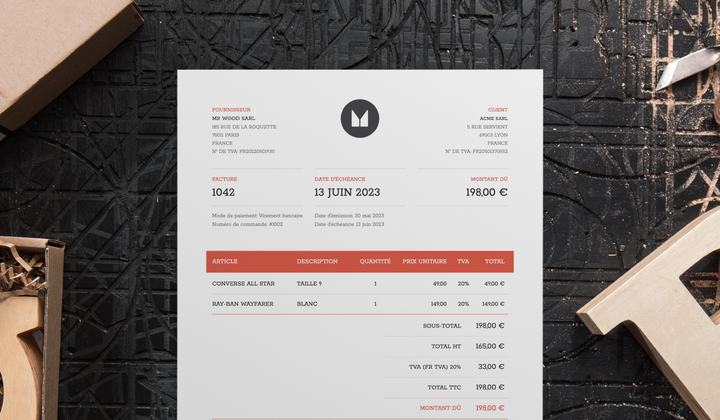
Invoices can be created in multiple languages and include all the necessary details to make them compliant with invoicing legislation in the EU.
Issuing invoices with the correct tax breakdown is crucial for your bookkeeping and tax purposes.
For B2B sales, Sufio invoices automatically include all required information, along with the VAT registration number (n° TVA, or Numéro d'identification à la taxe sur la valeur ajoutée) of both your store and your business customers.