In the EU, local invoicing legislation dictates that once you send an invoice to a customer, you can’t alter it. This means that businesses returning money to customers need to create a separatecredit note.
A credit note is a document that reduces or cancels all or part of an invoice. Businesses usually issue one after a return or refund, or to correct an invoice that has already been sent.
The credit note confirms that the return or refund was processed and that part (or all) of the original purchase price was returned to the customer.
In your online store, you can process a customer’s request to return an item or issue a refund for an order. In both cases, this means that a part of (or the full) original purchase price gets returned to the buyer.
A credit note is a statement detailing this transfer of funds from the store to the customer.
Its main purpose is to serve as a record of the transaction, and to confirm that the return or refund process was completed.
Credit notes also include an itemized list of goods originally purchased. If your customers are businesses, they may actually need such documents for their accounting purposes. In some countries, the local tax system requires that each addition or subtraction on their bank account needs to be backed by a document in their records.
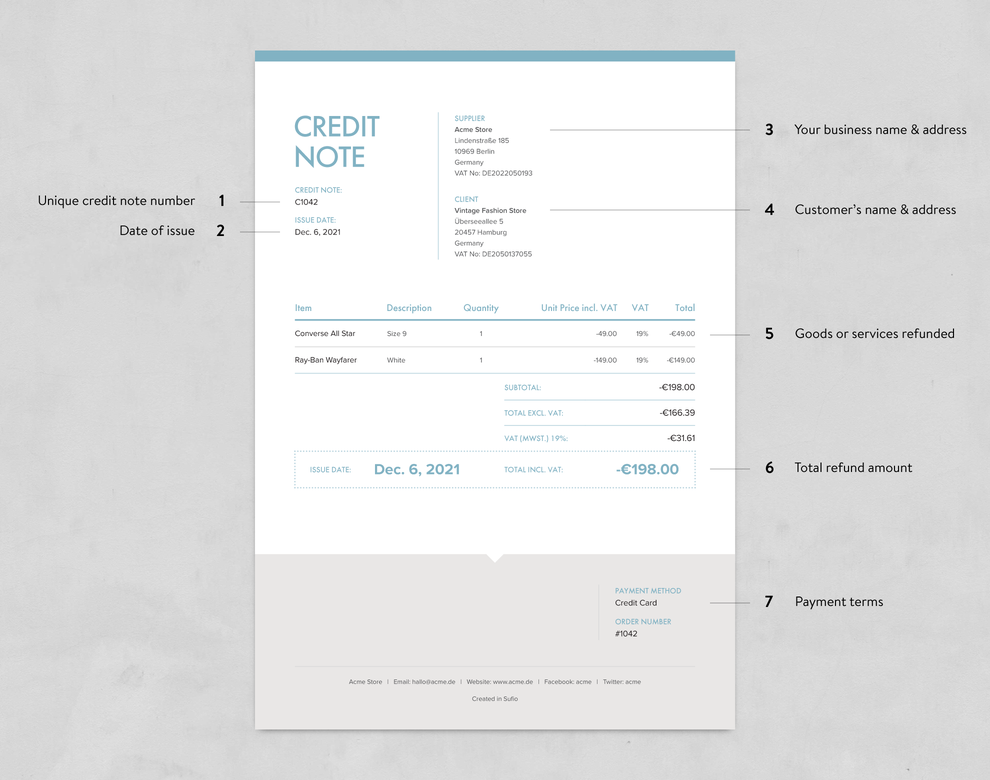
As a general rule, a credit note should show the same information as a compliant invoice. A credit note can and should contain:
- A clear title identifying the document as a credit note
- A unique credit note number
- The issue date
- Your business details, such as name, address, and VAT or tax number
- Your customer’s details, such as name, address, and VAT or tax number
- An itemized list of the returned or refunded goods or services, with quantities, unit prices, and tax rates
- The total refund amount, with totals excluding tax, the tax amount for each rate, and the total including tax, shown as negative amounts
- Payment details, such as the payment method, and a reference to the original order or invoice
Documents like invoices and credit notes do more than just provide detailed records of a transaction; they also represent an important touchpoint with your customers.
By including all the key information and presenting it in a clear and professional manner, credit notes help you build stronger business relationships. This is because the customer can trust you that you have processed their claim correctly.
The design of your credit note should also match your invoice and other important documents. In Sufio, credit notes use the same design as your invoices, so your brand stays consistent across every document your customers receive.
Credit notes are an integral part of the document ecosystem provided by Sufio. Our app lets you create and send credit notes using data from refunds, returns, and order edits recorded in your Shopify store.
This way, the process can be fully automated, and Sufio can handle the creation and sending of documents directly to customers.
To create credit notes automatically, select the Multiple documents per order document creation mode in Sufio. Within this mode, you can choose between two approaches, depending on the legal requirements of your country (or your preference).
Both approaches ensure that you and your customers have a clear view of transactions, minimizing confusion and administrative overhead.
If you use the One invoice per order mode, Sufio doesn’t create credit notes automatically. However, you can always create credit notes manually in your Sufio account, either from an existing invoice or as a standalone document.
Note
Shopify only lets you process the refund on the original bank account from which the purchase was made, ensuring a secure and consistent refund process.
Note
In Sufio, credit notes have their own numbering sequence, file name format, and default notes, separate from your invoices. You can set them up on the Settings → Documents page.>
For the original purchase, your customer receives a professionally designed invoice from Sufio.
Then, for every refund or return, they receive a corresponding credit note that covers only the refunded items. If items are later added to the order, Sufio creates an additional invoice for them.
The original invoice stays unaffected and valid. Together, all the documents reflect the current state of the order. For most merchants, this is the recommended approach.
When an order is refunded, returned, or edited, Sufio issues a credit note that cancels the original invoice in full and then creates a new invoice for the updated order. This happens every time the order changes.
This way, your customer always has one up-to-date summary invoice that reflects the latest state of their order. Keep in mind that this approach creates more documents per order.
Note
Learn more about how to set up automatic creation of credit notes and the different creation modes.
Please note that this feature is only available on our Professional and higher plans.
Credit notes are an excellent opportunity to create a positive impression of your brand. By paying attention to the design of your credit note, you can build a sense of trust and keep your branding consistent.
Are you looking for fully compliant credit notes for Shopify that still showcase your brand’s personality and style? Try Sufio and give your customers one more reason to remember your brand.