Shopify lets you choose whether your product prices include or exclude tax.
This setting affects how prices are displayed in your store, how much customers pay at checkout, and how taxes appear on your invoices.
Sufio, an invoicing app for Shopify stores, automatically reflects your Shopify tax settings on your invoices. To ensure taxes are displayed correctly, you'll first need to adjust how product prices are shown in Shopify.
To include or exclude tax from your product prices:
- In your Shopify admin, go to the Settings → Taxes and duties page.
- Scroll down to the Global settings section.
- To exclude tax from your product prices, uncheck the Include sales tax in product price and shipping ratecheckbox.
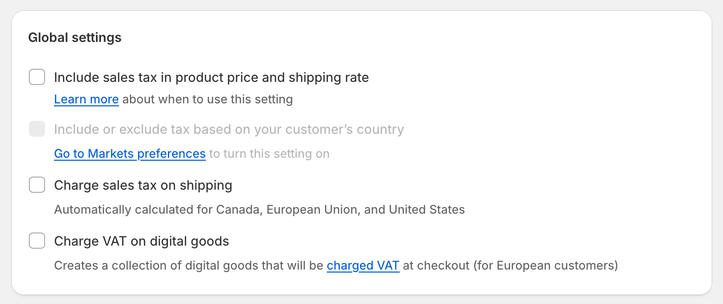
- To include tax in product prices, check the Include sales tax in product price and shipping rate checkbox.
- Click Save to apply your changes.
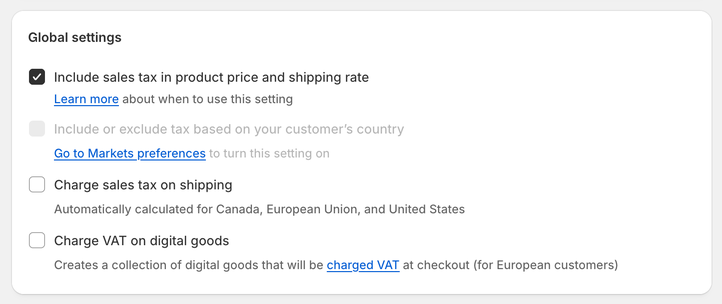
To automatically include or exclude tax based on your customer's country:
- In your Shopify admin, go to the Settings → Markets page.
- In the top-right corner of the page, click Preferences.
- Turn the toggle next to Include or exclude tax based on your customer’s country on.
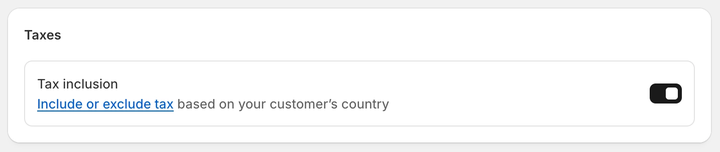
This setup displays product prices with tax yet allows you to VAT-exempt your business customers or customers with a disability
Let’s say a Shopify store based in France sells a product for €20. The store charges 20% tax to customers in France and 0% tax to customers in the US.
The table below shows how much customers in France and the US pay at checkout, depending on your Shopify tax settings.
| Customer in France pays | Customer in the US pays | |
|---|---|---|
| Prices exclude tax | €24 (€20 + €4 tax) | €20 (no tax) |
| Prices include tax | €20 (€16.67 + €3.33 tax) | €20 (no tax) |
| Prices include or exclude tax based on the customer's country | €20 (€16.67 + €3.33 tax) | €16.67 (no tax) |
When product prices exclude tax, the customer in France pays €24 in total: €20 for the product and €4 in tax. The customer in the US pays only €20 for the product, without tax.
This setup follows accounting legislation in many countries where VAT or GST is charged. It also allows you to charge tax only when it applies.
For example, you can charge tax to consumers while VAT-exempting your business customers in the European Union. You can also use this setting to avoid charging tax on certain products for customers with a disability or indigenous people.
When tax is excluded from product prices, your Shopify store displays prices without tax. This is useful if you mostly sell to businesses.
When product prices include tax, both French and US customers pay the same price of €20.
The customer in France pays €16.67 for the product and €3.33 in tax. The customer in the US pays €20 for the product, without tax. This means the US customer pays more for the same product than the French customer.
The advantage of tax-inclusive pricing is that all customers see the final price.
This is especially useful if you sell primarily to consumers or if your country’s legislation requires you to display tax-inclusive prices.
However, this setup is not suitable for online stores that need to VAT-exempt customers, such as businesses.
When product prices include or exclude tax based on the customer’s country, the customer in France pays €16.67 for the product and €3.33 in tax. The customer in the US pays only €16.67 for the product, without tax.
This option prevents some customers from paying tax that does not apply to them.
It also allows your Shopify store to automatically calculate and charge tax based on where your customer is shopping from.
This setup allows you to display prices with tax while still VAT-exempting some customers, such as businesses.
You can also use it to avoid charging tax on products for customers with a disability or indigenous people.
Caution
Changes you make to your Shopify tax settings apply only to new orders. Existing orders and invoices aren't updated automatically.