When customers receive invoices from your store, the sender address should look familiar and trustworthy.
If your domain is not authenticated, email providers may treat invoice emails as less trusted, which can affect whether they are delivered successfully.
Sufio, an invoicing app for Shopify stores, sends invoice emails and related documents on behalf of your store.
When you first set up your account, these emails are sent from an email address in the your-shop-name@sufioemail.com format.
This allows your customers to receive invoice emails before your domain is authenticated. They can still reply to these emails, and Sufio will forward their replies to the sender email address set up in your account.
To send invoice emails from your own sender email address, you need to authenticate your email domain. This allows Sufio to send emails from your domain and helps your emails comply with your DMARC policy.
This article covers:
To authenticate your email domain, you need to add Sufio’s DNS records to your domain in Shopify.
The required DNS records are automatically generated for you. You can copy them from your Sufio account and add them to your Shopify admin.
After the records are authenticated, Sufio can start sending emails on behalf of your domain.
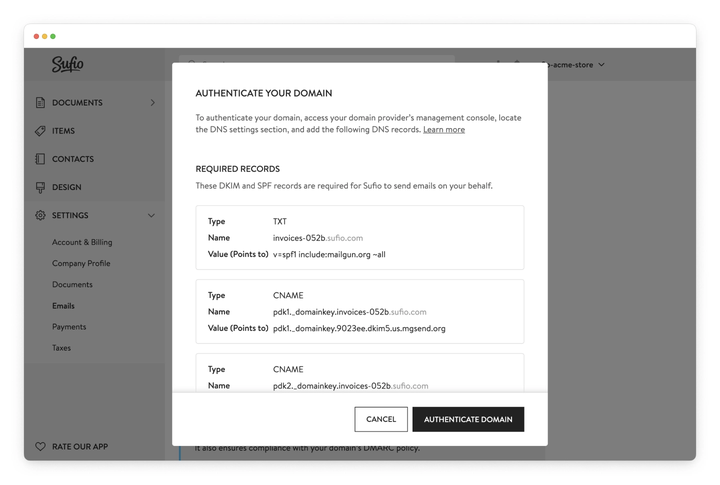
To generate DNS records for your email domain:
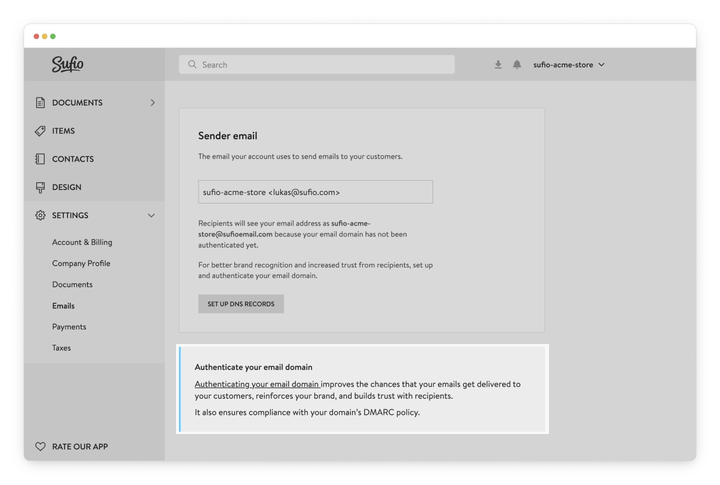
- In your Sufio account, go to the Settings → Emails page.
- In the Sender email section, click Set up DNS records.
Note
Before authenticating your email domain, keep the following in mind:
- You can only authenticate domains that you own. Domains provided by email services, such as gmail.com or yahoo.com, cannot be authenticated.
- Sufio uses a dedicated subdomain of your domain for authentication. For example, if your domain is acmeshop.com, the DNS records may use a subdomain such as invoices-txhq.acmeshop.com. This helps protect the reputation of your primary domain, especially when sending a high volume of emails.
To send emails on behalf of your domain, Sufio requires DKIM and SPF records.
DomainKeys Identified Mail (DKIM) helps email providers verify that an email was sent by an authorized sender and was not changed during delivery.
When Sufio sends an email from your domain, the recipient’s email provider checks that the email was signed with a valid Sufio DKIM key.
To set up DKIM records for your custom mailing domain:
- Open the list of DNS records for your email domain.
- In the Required records section in your Sufio account, navigate to the CNAME configuration snippets.

- In your Shopify admin, go to the Settings → Domains page and click the domain you use for your store.
- From the Domain settings dropdown, select Edit DNS settings.
- From the Add custom record dropdown, click CNAME record.
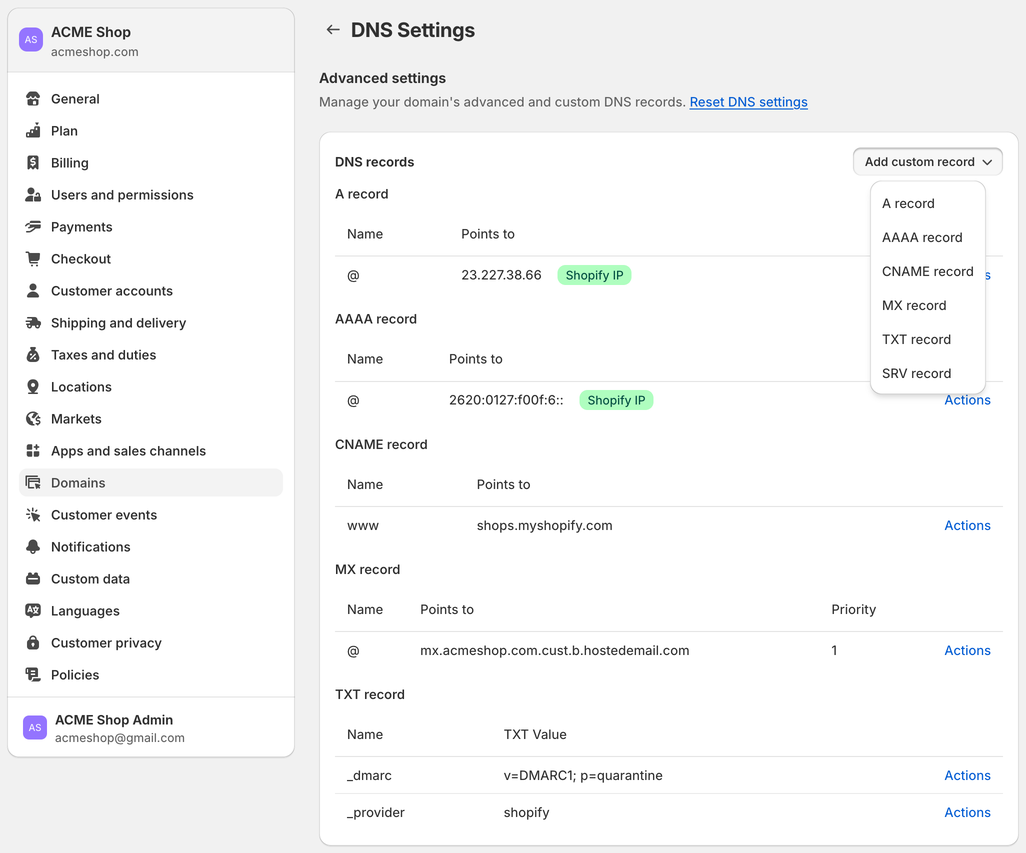
- In the Name and Points to fields, copy and paste the values from your Sufio account.
- Click Confirm.
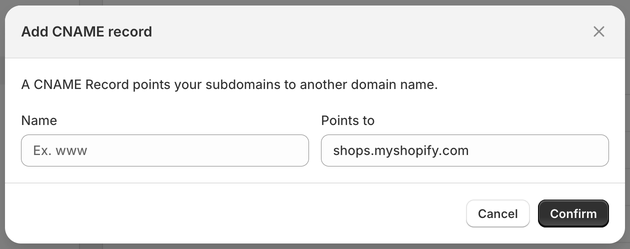
- Repeat the previous steps for the second CNAME record from the list of DNS records.
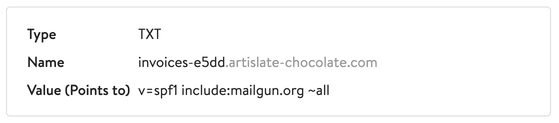
Sender Policy Framework (SPF) is a TXT record added to the Domain Name System (DNS). It lists the servers authorized to use your domain name to send emails.
To set up an SPF record:
- Open the list of DNS records for your email domain.
- In the Required records section in your Sufio account, navigate to the TXT configuration snippet.
- In your Shopify admin, go to the Settings → Domains page and click the domain you use for your store.
- From the Domain settings dropdown, select Edit DNS settings.
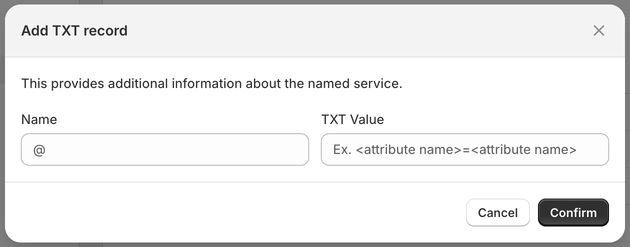
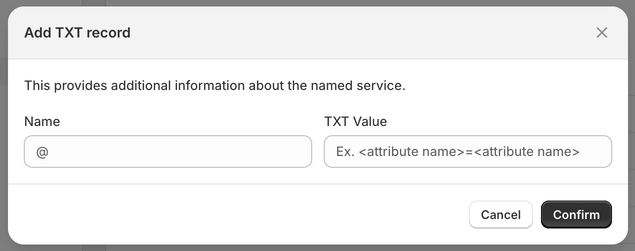
- From the Add custom record dropdown, click TXT record.
- In the Name and TXT value fields, copy and paste the values from your Sufio account.
- Click Confirm.
hese MX records are not required for Sufio to send emails on your behalf. However, they help improve email deliverability tracking.
When they are set up correctly, Sufio can track whether invoice emails have been successfully delivered to your customers.
Mail Exchange (MX) records tell email providers where to send incoming emails for your domain.
When Sufio sends an email to a customer, the recipient's mail server can send delivery information back to Sufio. The MX records ensure that this information reaches the correct destination.
To set up an MX record:
- Open the list of DNS records for your email domain.
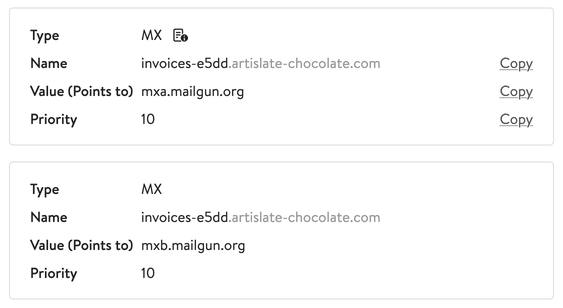
- From the Recommended records in your Sufio account, navigate to the MX configuration snippets.
- In your Shopify admin, go to the Settings → Domains page and click the domain you use for your store.
- From the Domain settings dropdown, select Edit DNS settings.
- From the Add custom record dropdown, click MX record.
- In the Name, Points to, and Priority fields, copy and paste the values from your Sufio account.
- Click Confirm.
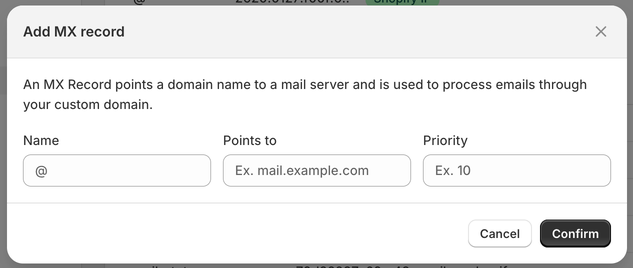
- Repeat the previous step with the second set of values.
Note
Sufio sends document emails from a dedicated subdomain.
These MX records are used only to track the deliverability of emails sent by Sufio and do not affect any other emails sent from your domain.
A DMARC policy record helps email providers verify that messages sent from your domain are legitimate. This improves email security and helps protect your domain from unauthorized use.
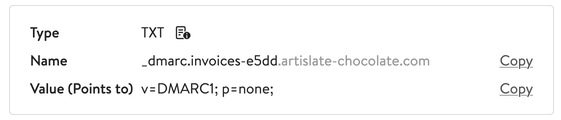
If your domain does not have a DMARC policy record yet, Sufio displays an example record in the pop-up window.
This record includes the minimum required configuration. You can also set up a stricter DMARC policy to enforce higher security standards.
To set up a DMARC record:
- Open the list of DNS records for your email domain.
- Navigate to the DMARC policy record configuration snippet.
- In your Shopify admin, go to the Settings → Domains page and click the domain you use for your store.
- From the Domain settings dropdown, select Edit DNS settings.
- From the Add custom record dropdown, click TXT record.
- In the Name and TXT value fields, copy and paste the values from your Sufio account.
- Click Confirm.
After you add the DNS records in Shopify, authenticate them in Sufio to verify that each record has been set up correctly.
- In your Sufio account, go to the Settings → Emails page.
- In the Sender email section, click Set up DNS records.
- Scroll to the bottom of the popup window and click on Authenticate domain.
Sufio automatically verifies your email domain setup. Once the records are authenticated, Sufio starts sending emails on behalf of your domain.
Please note that it may take up to 48 hours for changes to your DNS records to take effect.
Plan-specific feature
Email domain authentication is available on the Growth plan and higher.