Shopify offers a wide range of apps to help you create invoices and other important documents, but it can be difficult to find the right one if compliance is a primary concern.
The difference between simple order printer apps and dedicated invoicing apps isn't always clear, and we often see merchants feeling unsure about the legality of the solution they’re using.
In this article, we'll help you understand this key distinction before you decide on what's best for your Shopify store.
What is the difference between order printers and invoicing apps?
Both categories of apps help Shopify merchants generate essential documents like invoices, but they handle data, updates, and compliance in fundamentally different ways.
Order printer apps
Order printer apps always generate invoices from the latest order data in your Shopify store. While this sounds efficient, it quickly becomes an issue because orders often change over time.
For instance, customers might request refunds for specific items, or you might edit the order to add or remove products.
As a result, order printer apps regenerate the invoice to reflect these changes. This means you and your customers may end up with different versions of the same invoice.
In most countries, once an invoice is sent to customers, accountants, or tax officials, it’s expected to stay unchanged. Having multiple versions of the same invoice can therefore cause problems from both a legal and accounting perspective.
On the other hand, order printer apps tend to be very affordable, as they avoid the expenses of dedicated storage for separate invoice records.
Invoicing apps
In contrast, invoicing apps maintain a clear separation between your invoices and the underlying order data in your Shopify store. This approach guarantees that once an invoice reaches your customer, accountant, or tax authority, it stays unchanged, preserving its integrity as a reliable financial document.
When an order is changed, such as a refund or an addition of items, dedicated invoicing apps do not modify the original invoice. Instead, they generate additional documents to record the changes.
For example, a credit note will list all refunded items, creating a complete and auditable trail without compromising the initial invoice.
Compared to order printer apps, invoicing solutions often include advanced features designed to meet legal invoicing requirements, such as sequential numbering of your invoices or support for e-invoicing standards. These extras make them a stronger choice for businesses prioritizing regulatory compliance.
However, this added functionality does come at a higher cost, reflecting the investment in more robust systems.
Finally, because these apps store independent copies of your financial documents outside the store's order data, selecting a dependable provider is essential. Look for a solution that prioritizes data security and scalability as your invoicing volume grows.
1. Sufio
Sufio is a professional invoicing app that’s fully integrated with Shopify. It automates the key invoicing tasks while helping ensure tax and legal compliance—especially for merchants selling internationally or to other businesses.
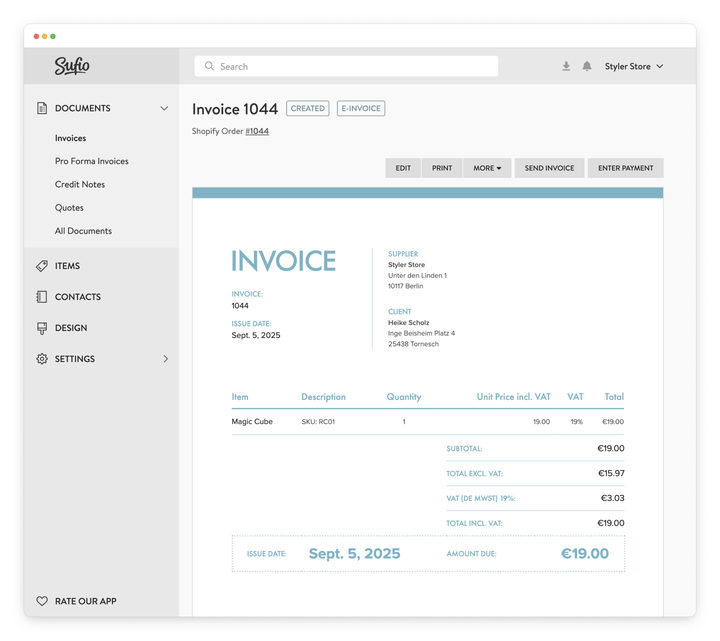
The app automatically creates and sends the right documents—such as invoices for orders and credit notes for refunds and returns—to reflect any changes made to an order.
This helps ensure that documents are accurate and sent at the appropriate time without manual work. The app can also handle sending automatic reminders for overdue invoices.
By keeping your documents separate from your orders, Sufio can meet critical invoicing requirements—such as independent sequential numbering of your invoices and support for upcoming e-invoicing standards.
As required by law in many countries, it provides secure 10-year storage for your documents, even if you archive or delete old orders in your store or decide to close your store completely.
The app is officially recommended by Shopify for B2B thanks to its native integration with Shopify's B2B feature set, including support for payment terms, PO numbers, and automatic tax exemptions for business customers with valid VAT numbers.
For merchants with a global customer base and cross-border sales, Sufio provides commercial invoices for exports, multi-currency support, and can create documents in 40 different languages.
From a design perspective, Sufio offers editable templates so businesses can customize the look of their documents. Users can make basic changes in a simple visual editor or edit the template code for complete control. For businesses needing their documents to fully reflect their brand identity, Sufio allows the use of over 40,000 premium fonts from Monotype.
Pros:
- Full automation of invoices, credit notes, and reminders
- Strong focus on compliance, including e-invoicing support
- Native integration with Shopify B2B
Cons:
- Sits in the higher price range compared to many order printer apps
2. Simple Invoice
Simple Invoice is an order printer app that offers a more robust feature set than many similar tools. It supports automatic sending of invoices, lets customers pay via Stripe or PayPal links, and integrates with cloud storage platforms like Google Drive and Dropbox.
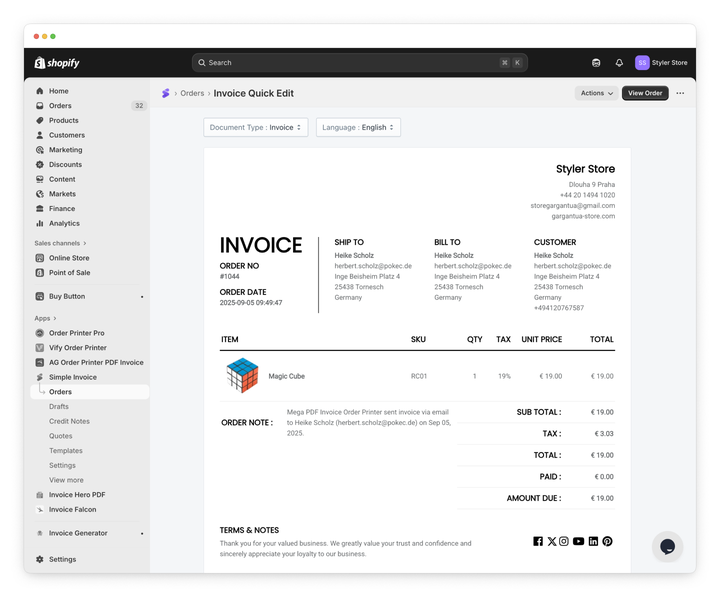
The app also provides decent multilingual support, automatically creating invoices in the customer’s language. However, its automation is more limited, often relying on on-demand document creation rather than a fully event-based automated workflow.
Important customization options, such as template code editing, are locked behind its most expensive plan, and its credit note functionality is quite basic—lacking the level of detail needed for complex return scenarios.
Pros:
- Flexible payment options, including Stripe or PayPal links
- Supports automatic sending of invoices
Cons:
- Documents other than invoices still require on-demand creation
- Template customization is locked behind the highest plan, which starts at $79.99 per month
3. Invoice Falcon
Invoice Falcon is a budget-friendly order printer app that shines in one particular area: payment reminders. It offers a well-built tool for scheduling and sending reminders for unpaid invoices, a feature many competitors overlook. It also includes automatic sending, a visual template editor, and multilingual support.
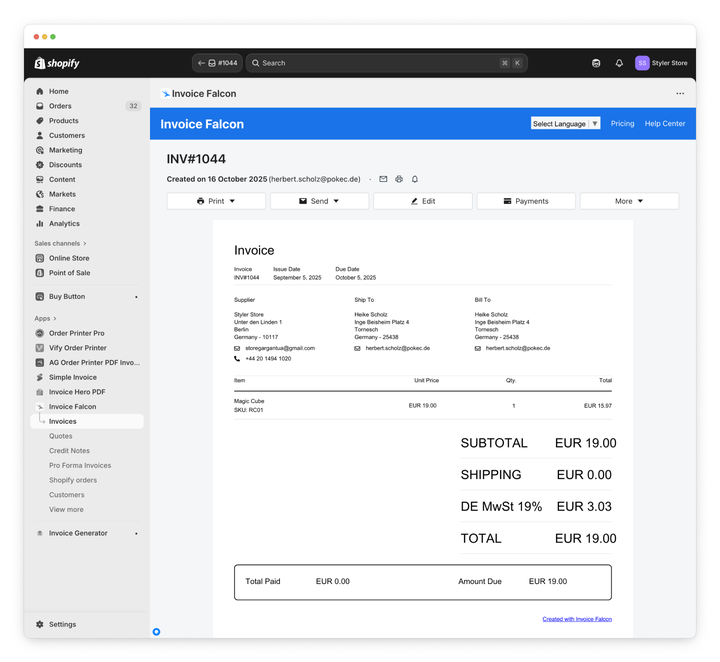
Despite these strengths, the app falls short in key areas. Its automation for creating documents is still on-demand, not event-driven. The credit notes it generates are very basic, often resembling the original invoice with only the title changed.
Most importantly, it lacks essential B2B features like PO number support, making it less suitable for wholesale merchants.
Pros:
- Advanced reminder sending system
- Budget friendly, with a free plan or a $15/month paid option
Cons:
- Documents are created on-demand rather than through an automated workflow
- No integration for online payment links or automatic cloud upload
- Missing necessary B2B support such as PO or VAT numbers
4. Order Printer Pro
Order Printer Pro is, as the name suggests, an order printer app, and a popular choice for merchants who need a simple, lightweight tool for generating invoices and packing slips. Its main appeal is a generous free plan and a template editor that uses Shopify’s Liquid, giving experienced merchants a familiar environment for customization.
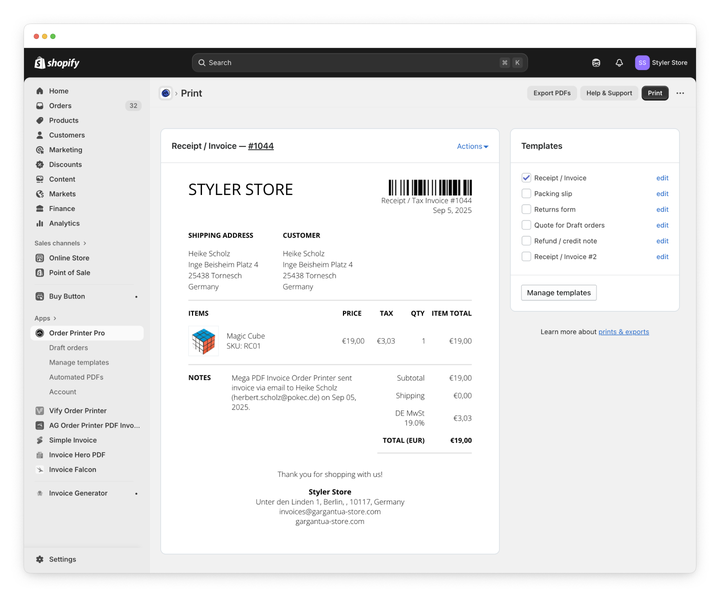
However, the downside is that it only offers a code-based editor; if you are unfamiliar with editing your templates via code, there is no visual option for you.
Its automation can also be misunderstood. The app doesn’t truly automate document creation or sending. Instead, it relies on you adding download links to Shopify’s existing notification emails. Documents are generated only when a customer clicks those links.
It also has limited B2B support and lacks the more advanced credit note or compliance features legally required for growing businesses.
Pros:
- Easy to customize for merchants familiar with Shopify’s Liquid template editor
- Supports 34 languages for documents
Cons:
- The majority of document creation and sending is handled manually via email links - not truly automated
- Limited flexibility for credit notes in complex refund situations
- Only offers a code-based editor for customization, no visual editor
5. Invoice Hero PDF
As a low-cost entry point, Invoice Hero is an order printer app that handles basic invoicing needs. It offers automatic sending, a visual template editor, and supports commercial invoices with HS codes. It also allows for minimal customization of invoice numbers with prefixes and suffixes, which is a step up from the most basic apps.
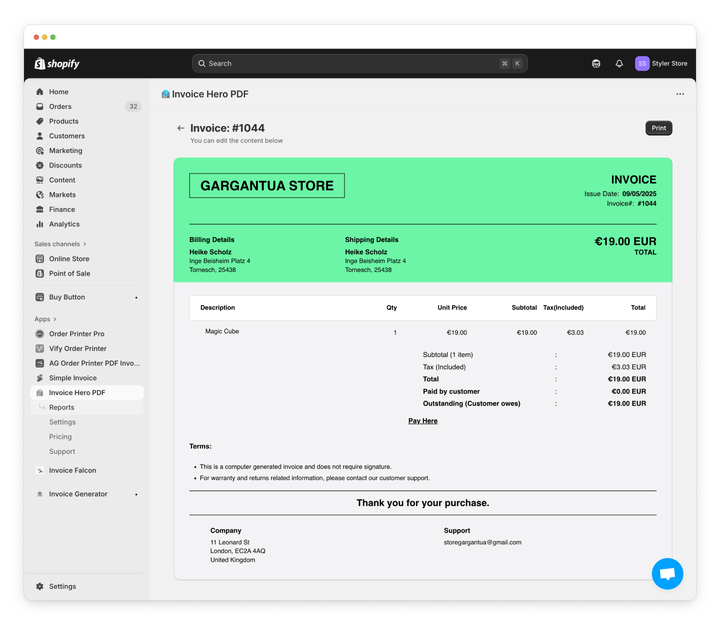
The trade-offs, however, are noticeable. Invoice Hero has no credit note system—only a “refund” line added to the original invoice. It also lacks multilingual support, packing slips, and any features aimed at B2B merchants.
This tool is best suited for merchants who need a simple, modestly branded invoice; it may not be suitable for businesses that require more advanced functionality or need to stay compliant with local regulations as they grow.
Pros:
- Supports commercial invoices with HS codes and Country of Origin values
Cons:
- No proper credit notes, only the addition of a “refund” line to the invoice
- No multilingual store support
- Lacking packing slips or delivery notes
6. Vify Order Printer
Vify is an order printer app similar to Order Printer Pro, with the key difference that it only offers a visual template editor, making it accessible for non-technical users. It can automatically send invoices and integrate with Google Drive for storage, both welcome additions for streamlining workflows.
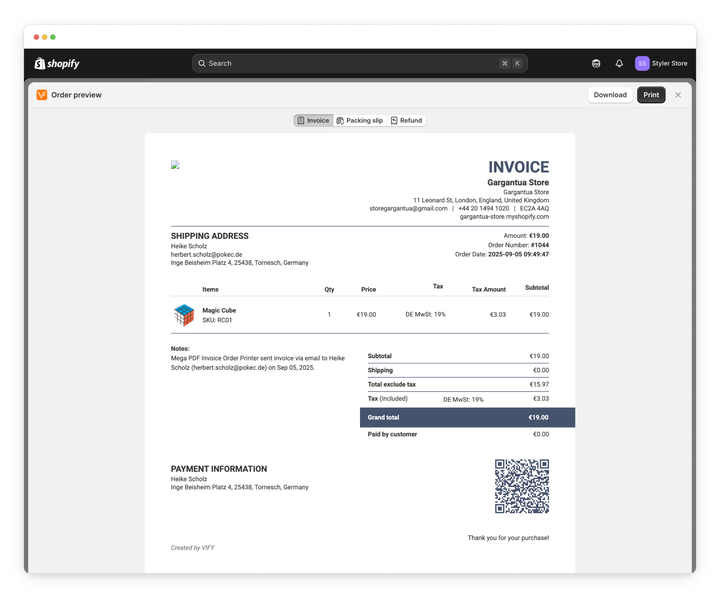
Its automation is trigger-based and on-demand, rather than fully automatic. While it claims support for over 160 languages, the translations appear machine-generated and can be inaccurate. Credit note options are limited, and it also lacks key B2B features.
Pros:
- Customizable templates through a visual editor
- Cloud integration with Google Drive for automatic uploads of PDF invoices
Cons:
- Machine-generated translations that may require manual review for accuracy
- Only basic credit notes, with no options for more complex returns
- No support for VAT numbers from B2B company locations
7. Avada AG Order Printer PDF Invoice
Avada aims to be a feature-rich, budget-friendly order printer app designed for on-demand document generation. While it supports automatic invoice sending when an order is created, there is no automation in the actual invoice creation.
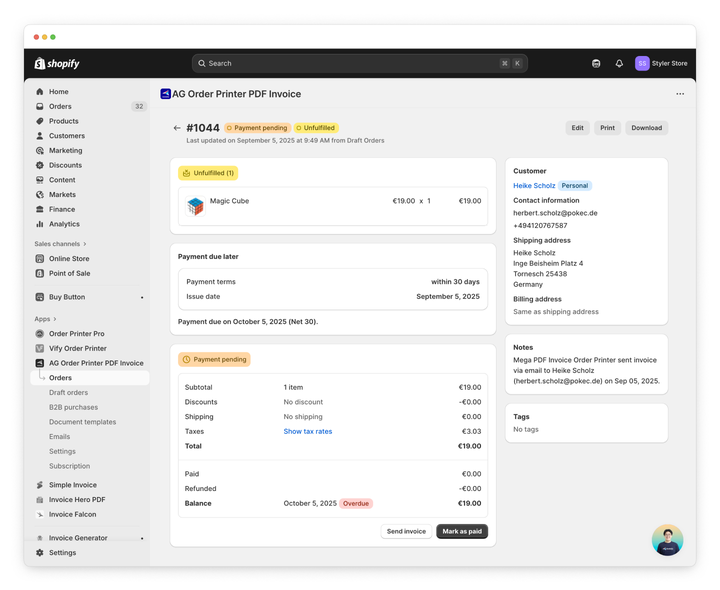
It also offers the creation of packing slips and credit notes, though only manually, and advanced features like sequential numbering and multilingual support are limited.
Although Avada includes useful features like bulk PDF exports, Shopify POS integration, and a visual template editor, the lack of automation remains a drawback.
Pros:
- Integrates with Shopify POS
Cons:
- No automation for invoice creation
- Unreliable language translations for documents
- No support for commercial invoices
8. Shopify Tax Invoices
Shopify Tax includes a free solution for generating invoices, but it’s undoubtedly the most basic option available. It automatically generates a simple invoice when an order is placed and makes it available to customers, using your store’s language and settings.
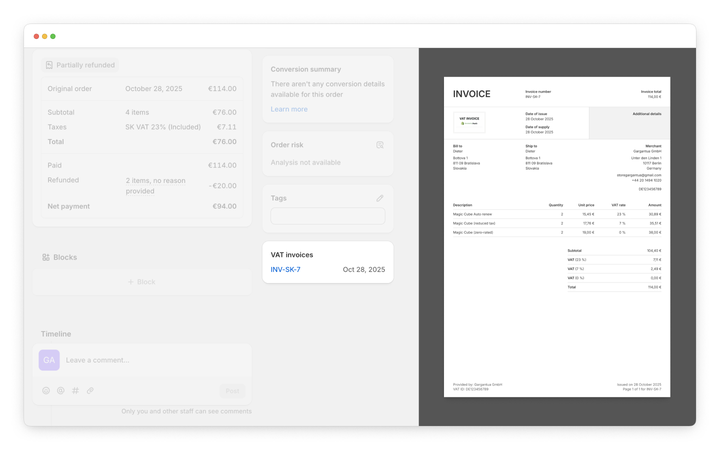
One clear advantage is how it handles storage: invoices are generated as PDF files and saved in Shopify's cloud, meaning they remain fixed and unaltered even if you later edit the order details. This stability aligns well with the need for unchanging financial records.
That said, the positives quickly stop there. Customization is very minimal; you can only add your logo, and the default template lacks modern formatting and key details like sequential numbering or detailed breakdowns. More notably, it cannot produce follow-up documents to track order changes, such as credit notes for refunds or returns.
There is also no support for packing slips, B2B-specific features, or automated sending options. While it serves as a simple starting point for small operations, most growing merchants may quickly find it inadequate and eventually outgrow it.
Pros:
- Free and fully native to Shopify so it’s easy to integrate
Cons:
- No automation—whether that’s creating or sending documents
- No B2B support, integrations or packing slips
- Missing features required for compliance in many markets
The final verdict
Every store has unique needs when it comes to invoicing. For new merchants, a simple order printer may cover the essentials, while growing and established brands often require more robust features to streamline operations and stay compliant as they expand into cross-border sales.
As outlined, there are various invoicing apps available, each offering different levels of automation, customization, and compliance support.
If you’re looking for a complete solution that handles B2B requirements, cross-border sales, and stays up to date with evolving legal and e-invoicing standards, Sufio is built for that level of complexity.
If you’re not sure what your store really requires, our team is always happy to look at your setup and suggest a way forward—even if Sufio isn’t the best fit right now.
The right choice depends on your priorities, whether that’s simplicity, automation, or scalability.
Written by Djimi
Head of Support at Sufio
Djimi is a jack-of-all-trades with a passion for technical and community-focused projects. As Head of Support at Sufio, he leads a skilled team dedicated to providing excellent customer service and technical assistance. His role combines strategic leadership, coaching, and a commitment to improving customer experiences—all essential to Sufio's success.
Professional invoices for Shopify stores
Let Sufio automatically create and send beautiful invoices for every order in your store.
Install Sufio - Automatic Invoices from the Shopify App Store