Display PO numbers on your Shopify invoices
We’re always looking for new ways to improve our support for Shopify’s B2B features.
After our recent work on payment terms, we thought the next logical step was to introduce support for the automatic inclusion of purchase order numbers on invoices created from B2B orders in Shopify.
Let’s find out how it all works…
What is a purchase order?
A purchase order is a document that represents the customer’s intent to buy the products listed on the PO from you (the supplier).
Business customers may prefer to track their purchases with purchase order (PO) numbers because it allows them to track shipments, make payments, and better integrate this data into their inventory management system.
How to add PO numbers to your Shopify invoices
Shopify supports adding PO numbers to B2B orders.
Customers can add a PO number when placing a B2B order. You can also add a PO number when creating or editing an order in your Shopify admin.
Alternatively, you can capture a PO number on the cart page.
If an order contains a PO number, Sufio automatically includes it on invoices created from that order.
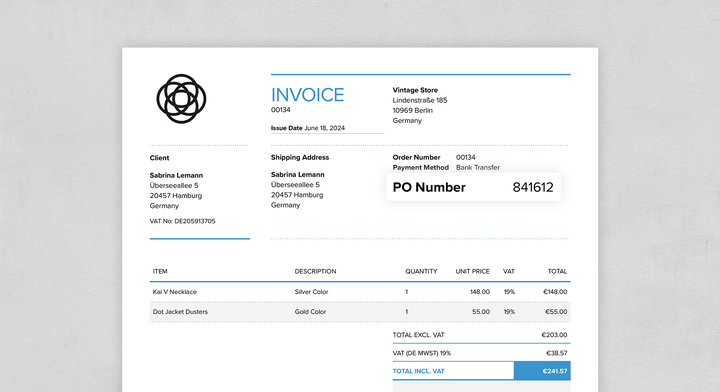
Sufio displays the PO number in the payments section of the invoice. You can change its position or customize the label on the Design → Payments page.>