Payment details tell customers how and where to pay. Displaying this information clearly helps prevent confusion and reduces delays in payment processing.
In Sufio, payment items can be edited to control which details appear on documents and how they are presented.
This allows invoices and credit notes to match internal payment workflows and business requirements.
To adjust how payment details appear on documents:
- In your Sufio account, go to the Design page.
- In the left-hand menu, select Payments.
Within the Payments section, payment items can be customized in three ways:
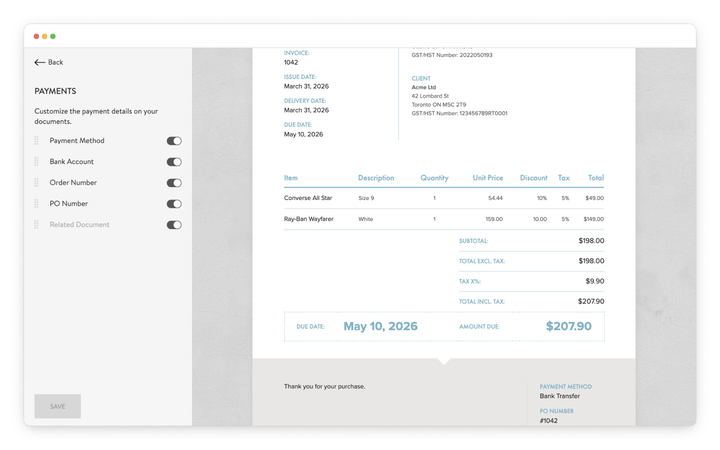
Use the toggle controls to decide which payment details appear on documents. This allows only relevant payment information to be displayed to customers.
Items appear on documents only when they contain a value, even if the toggle is enabled.
To change how a payment item appears on the document, click the edit icon next to the item name and enter a new label.
Renaming item labels helps align document terminology with internal naming conventions or preferred wording.
You can change the order of payment items by dragging them into the desired position. This allows payment information to appear in a structure that best fits the document layout.
The Related Document item displays the type and number of a document linked to the current document.
For example, a credit note can display the number of its related invoice, while an invoice created from a pro forma invoice can display the originating pro forma number.
If there is no related document, the item will not appear even when enabled.
Note
Showing a payment detail item controls its visibility on the document, but it does not create or change its value.
A payment detail appears only if the document contains a value for it.
To display it on your document, add or update the payment details directly in the document:
- Open the document in your Sufio account.
- Click to edit the document.
- Enter the payment details (such as Payment method, Bank account, or PO number).
- Save your changes.
If no value is defined, the item will not appear, even if it is enabled in the design settings.
Renaming a payment item only changes how the label appears on the document.
It does not change the underlying data. To modify the content, update the payment details in the document.