The footer of your documents typically contains company contact details and useful links, such as a link to the online version of the document.
In Sufio, you can choose which contact details for your company or online store appear in the footer, for example, your email address, phone number, website, or social media profiles, as well as a message.
To customize your company contact details in the footer:
- In your Sufio account, go to the Design page.
- In the left-hand menu, select Footer.
Footer contact items can be customized in three ways.
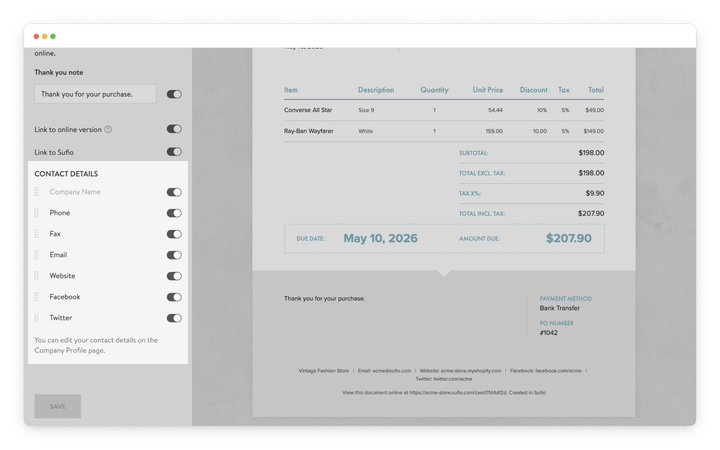
Use the toggle controls to decide which company contact details appear in the footer.
Typical footer items may include Phone, Email, Website, or social media profiles.
Displaying only the relevant contact details helps keep documents clear and easy to read.
Contact items can be reordered by dragging them to change the order in which they appear on documents.
This helps keep the footer structure consistent across invoices and other documents.
To change how a contact item appears on the document, click the edit icon next to the item name and enter a new label.
Renaming labels allows the document terminology to match internal naming conventions or brand guidelines.
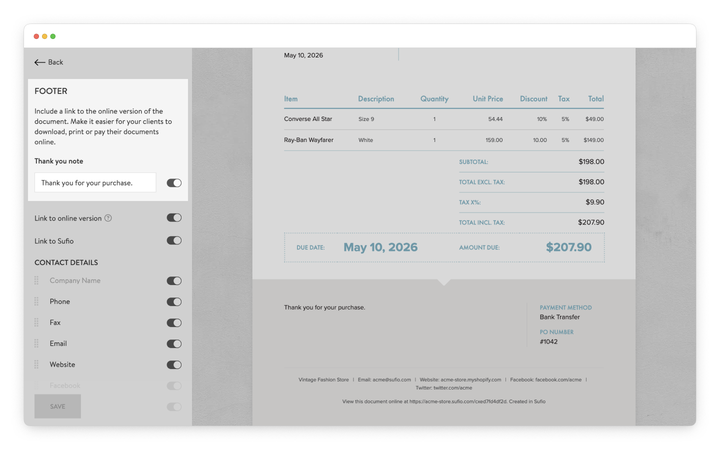
A message can be added to the footer, such as a personalized thank-you note for customers.
To add or edit a footer note:
- In your Sufio account, go to the Design page.
- In the left-hand menu, select Footer.
- Enter your message in the Thank you note field.
- Turn on the Thank you note toggle to display the message on your documents.
- Click Save to apply the changes.
The message will appear below the footer contact details on documents.
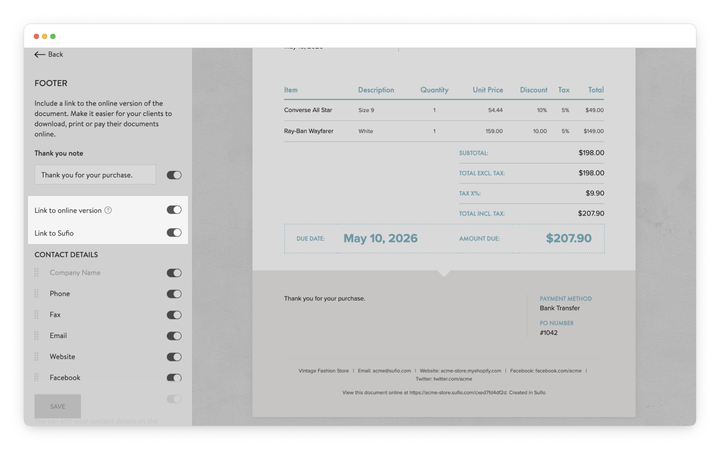
Links can be added to help customers access additional information or open the online version of a document.
To customize the links that appear in the footer:
- In your Sufio account, go to the Design page.
- In the left-hand menu, select Footer.
- Use the toggle controls to enable or disable the following options:
- Link to online version: Adds a link that opens the online version of the document.
- Link to Sufio: Adds a small “Created in Sufio” link.
Professional invoices for Shopify stores
Let Sufio automatically create and send beautiful invoices for every order in your store.
Install Sufio - Automatic Invoices from the Shopify App Store