Your invoices and credit notes include important information about your business, such as your company name and address.
In Sufio, the Design page allows control over how these company details appear on documents. This includes adjusting the section heading and choosing whether the country name is displayed in the company address.
These settings affect only the presentation of company details, not the underlying company information stored in your account.
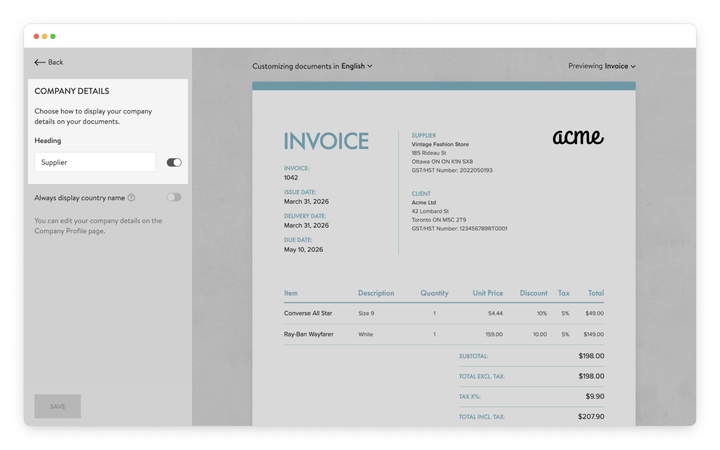
The company details heading identifies the section that contains your business information on the document, such as the supplier name and address.
By default, this heading may appear as Supplier, but you can change it to better match your preferred terminology or hide it entirely.
To customize the heading:
- In your Sufio account, go to the Design page.
- In the left-hand menu, select Company Details.
- Under Heading, edit the text field to rename the heading.
- Use the toggle to show or hide the heading on documents.
- Click Save to apply the changes.
Your documents will automatically update to reflect the selected heading settings.
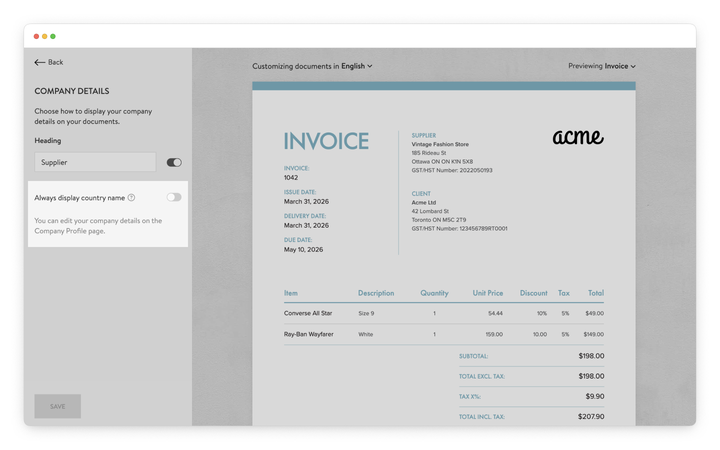
By default, Sufio does not display the country name when both the company and the customer are located in the same country.
For documents issued to customers in a different country, the country name is automatically included in the address.
To always display the country name:
- In your Sufio account, go to the Design page.
- In the left-hand menu, select Company Details.
- Enable the Always display country name toggle.
- Click Save to apply the changes.
The country name will now appear in your company address on all documents.
Note
Company information such as the business name, address, and contact details can be changed on the Settings and Company Profile page.
Changes made there are automatically visible on your documents.
Professional invoices for Shopify stores
Let Sufio automatically create and send beautiful invoices for every order in your store.
Install Sufio - Automatic Invoices from the Shopify App Store