Finding a specific document can become more difficult as your business grows and your document list expands.
Sufio includes built-in search and filtering tools to help you quickly find invoices, credit notes, quotes, and other important documents.
You can search by key information, filter documents by different criteria, or combine both to narrow down your results before printing, downloading, exporting, or reviewing your documents.
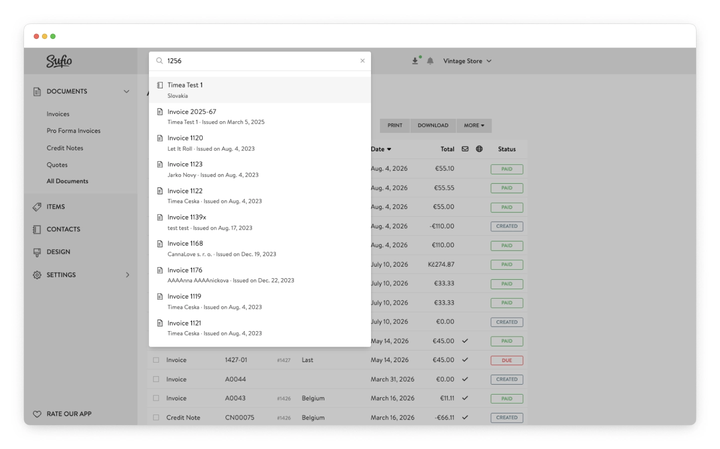
Use the Search field at the top of your Sufio account to quickly find documents.
As you type, matching results appear automatically. Select a result to open the document.
When searching documents, you can search by:
- Document number (invoice, credit note, quote, etc.)
- Shopify order number
- Purchase order (PO) number
- Customer name
- Item name
Select a result from the search list to open the document.
Note
When searching using the email address or phone number, enter the full value to get an exact match.
Search can return different types of results, including documents, items, and contacts.
To limit your search to one result type, enter its two-letter keyword at the beginning of your search:
do:for documentsit:for itemsco:for contacts
For example, enter co: John Smith to search only contacts matching John Smith.
To narrow down your search results, start your search with a document type.
You can filter search results by:
- Invoice
- Pro forma invoice
- Credit note
- Quote
You can also enter a shortcut at the beginning of your search:
in:for invoicespf:for pro forma invoicescn:for credit notesqt:for quotes
For example, enter cn: C1234 to search only credit notes matching C1234.
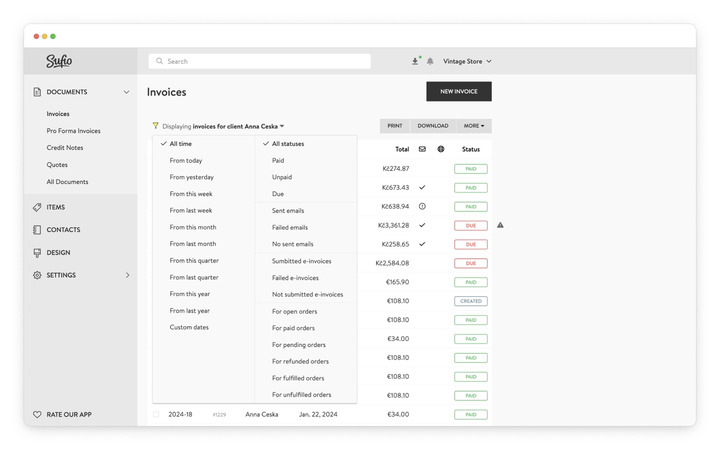
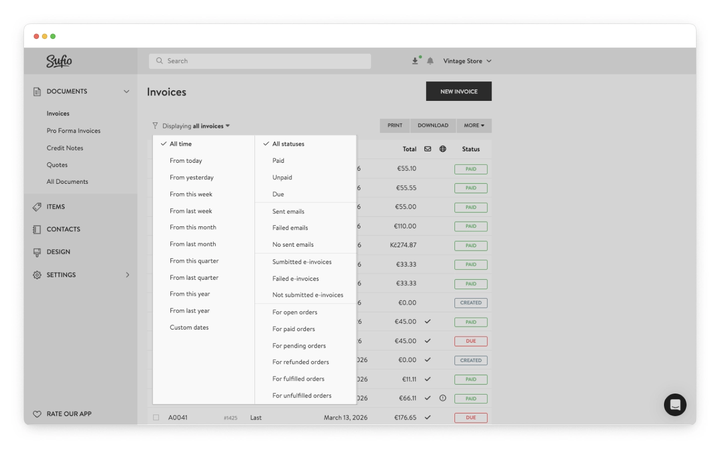
Use the filter menu above the document list to narrow down the documents displayed on the Documents page.
The filter menu lets you filter documents by issue date or status.
Once you apply a filter, the page heading updates to show the current view, making it easy to see which documents are being displayed.
For example, after selecting Unpaid, the page displays Displaying unpaid invoices.
Filter documents by their issue date using one of the available date ranges or a custom date range.
Available date filters include:
- All time
- From today
- From yesterday
- From this week
- From last week
- From this month
- From last month
- From this quarter
- From last quarter
- From this year
- From last year
- Custom dates
These filters are useful when reviewing documents from a specific accounting period or preparing reports.
You can also filter documents by different status types.
Payment status
Filter documents by payment status:
- Paid
- Unpaid
- Due
Email status
Filter documents by email delivery status:
- Sent emails
- Failed emails
- No sent emails
E-invoice status
If you use e-invoicing, filter documents by submission status:
- Submitted e-invoices
- Failed e-invoices
- Not submitted e-invoices
Shopify order status
Filter documents by the status of the related Shopify order:
- Open orders
- Paid orders
- Pending orders
- Refunded orders
- Fulfilled orders
- Unfulfilled orders
You can combine search and filters to narrow down your results.
When you apply a filter after searching, Sufio keeps your search criteria and applies the selected filter to those results.
For example, to find recent invoices for a specific customer:
- Search for a customer, such as
John Smith. - Open their invoices from the search results.
- Apply an issue date or status filter, such as From this month.
- Sufio displays only the invoices that match both criteria.
The filter menu updates to show the criteria currently applied so you can easily see which documents are being displayed.